
A work order system is how maintenance work gets requested, assigned, completed and proven, with one record per job tied to the machine it happened on. You need one the day you can’t answer three questions in under a minute: what’s open right now, who has it, and what happened the last time this machine went down.
Most shops don’t lack effort. They lack a record. The work gets done, but it lives in a text thread, a whiteboard, a clipboard in the truck and the memory of whoever was on shift. That works until it doesn’t, and when it breaks it breaks expensively. Siemens’ True Cost of Downtime 2024 report puts unplanned downtime at roughly $1.4 trillion a year for the world’s 500 largest companies, about 11% of their revenue, with the average large plant losing 27 hours a month.
You don’t have to be a Fortune 500 company to feel a smaller version of that number. This guide covers the signs you’ve outgrown your current process, the real reasons teams put off a work order system, and 10 reasons it pays for itself.
The short version: a work order system turns maintenance from something people remember into something you can see, plan and prove. If jobs slip through the cracks, PMs get skipped, or you can’t pull a machine’s repair history, you’ve already outgrown paper and spreadsheets.
What is a work order system?
A work order system is software that tracks every maintenance job from the moment it’s raised to the moment it’s signed off. Each work order records the asset, the problem, the priority, who it’s assigned to, the tasks, the parts used, what was found and the corrective action taken. Over time those records add up to a full maintenance history for every machine you own.
A work order system is usually one part of a CMMS. The CMMS connects each work order to the asset registry, the preventive maintenance plan and your spare parts, so a job isn’t just logged, it’s in context.
8 signs you need a work order system
If three or more of these sound familiar, the process is costing you more than the software would.
- Requests arrive every way except one. Texts, hallway conversations, sticky notes, calls to your cell. Nobody has the full list.
- You can’t see the backlog. Ask how much open work there is and the honest answer is “a lot.”
- The same machine keeps breaking. Nobody can prove it, because every repair was a one-off with no history.
- PMs happen when someone remembers. Oil changes, inspections and filter swaps slide whenever the week gets busy.
- Audits are a scramble. Proving work was done means digging through binders, emails and signatures on paper that may or may not exist.
- Parts disappear into jobs. Stock drops, but nobody knows which job or which machine it went to.
- Your best tech is your system. When he’s on vacation, half the answers go with him.
- You’re running on a spreadsheet that one person understands. If that sounds familiar, read the 7 signs your maintenance team has outgrown Excel.
Why companies put off investing in a work order system
Almost every maintenance manager knows they need better tracking. The delay usually comes from one of these objections, and most of them hold up better in a meeting than on the shop floor.
“Paper works fine for us.”
Paper works for recording a job. It fails at everything after that. You can’t search it, total it, spot a repeat failure in it or pull it up from a truck. Paper tells you a job happened. It can’t tell you what’s coming.
“My techs won’t use it.”
Techs don’t resist software. They resist software that slows them down. If the app works on their phone or tablet, opens the right asset in a couple of taps and still works where there’s no signal, adoption takes care of itself. If it needs a desk and a login they forget, it won’t.
“It’s too expensive.”
Compare it to the cost of one missed PM on a critical machine, or one unplanned day of downtime. The real pricing trap is the model, not the sticker. Many tools charge per user per month, so every tech you add raises the bill and teams start sharing logins to save money, which wrecks the audit trail. Ask any vendor how the price scales as your crew and your equipment grow.
“Implementation will take forever.”
It doesn’t have to. Start with one site and your most critical assets, get work orders flowing, then add preventive maintenance and parts. Most teams are live in weeks, and the vendor should load your asset data and train your people rather than handing you a login and a help center.
“We’re too small.”
Small teams feel lost knowledge the hardest. When there are three techs, one resignation takes a third of your know-how with it. A work order system is how a small team stays organized without adding a planner.
“Our ERP already does work orders.”
ERP maintenance modules are built to track money, not maintenance. They rarely handle multi-step jobs, field sign-offs or mobile use well. We broke this down in CMMS vs ERP for facilities.
10 reasons your company needs a work order system
1. Nothing falls through the cracks
Every request gets logged in one place with a status, an owner and a priority. The job someone mentioned in passing on Tuesday doesn’t vanish by Friday.
2. You can see and plan your backlog
A backlog you can’t see is a backlog you can’t plan. With every open job in one list you can filter by site, asset, priority or status, and decide what gets done this week instead of reacting to whoever called last.
3. Every repair builds the machine’s history
Each closed work order adds to the asset’s record. When a pump fails for the fourth time in a year, you can see it, and you have the facts for the repair-or-replace conversation instead of a hunch.
4. Preventive maintenance actually happens
Good systems create PM work orders automatically from a calendar schedule or a meter reading, like engine hours or miles. The oil change shows up as a job on the right day, not a note in someone’s head. Pair it with preventive maintenance software and PM stops depending on memory.
5. Clear accountability with real sign-offs
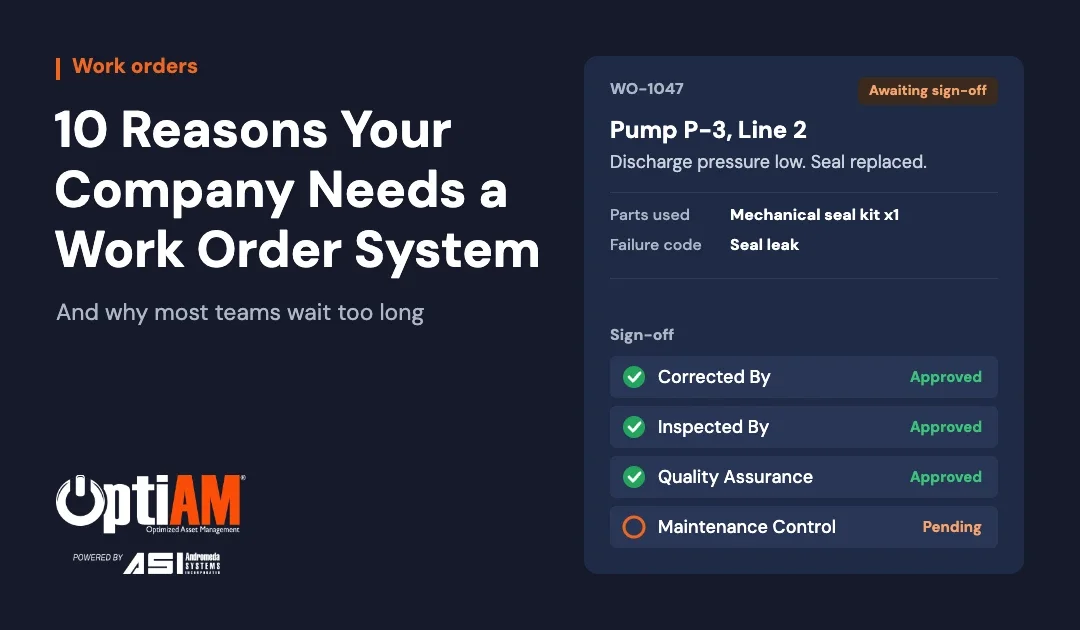
Every job has an owner, and important work can require more than one signature before it closes. A real-world chain looks like this: corrected by the technician, inspected by a second tech, reviewed by quality assurance, then closed by maintenance control. Each level approves or rejects.
6. You’re audit-ready every day
When a work order can’t close until every task is complete and the required fields are filled in, your records are complete by default. Inspectors, insurers and safety auditors ask for proof. A work order system hands it to them in minutes instead of days.
7. Parts get tied to the job that used them
When parts are issued against a work order, you know which machine consumed them and why stock is dropping. That’s the start of spare parts management that sets reorder points on real usage instead of guesswork.
8. Better failure data means better decisions
Failure codes, corrective actions, inspection results and photos turn every repair into data. That data feeds reliability-centered maintenance, where you decide which maintenance is worth doing based on how equipment actually fails.
9. Techs can work where the work is
Breakdowns don’t happen next to a desk. A mobile CMMS app lets technicians pull up the asset, update the job and capture photos from the floor, the yard or the field. The good ones keep working with no signal.
10. Knowledge stays when people leave
Every documented job is something the next person doesn’t have to relearn. When your 25-year tech retires, his history on every machine stays in the system. It’s the backbone of training new maintenance technicians faster.
Still running maintenance on a spreadsheet?
The Spreadsheet Check takes a few minutes and shows whether your current setup is still doing the job or quietly holding you back.
What to look for in a work order system
| Must-have | Why it matters |
|---|---|
| Work orders tied to assets | Every job builds that machine’s history |
| Automatic PM work orders | Calendar and meter-based PMs stop depending on memory |
| Mobile app that works offline | Techs can close work where there’s no signal |
| Required fields and sign-offs | Complete, audit-ready records by default |
| Parts linked to jobs | You know where stock went and what to reorder |
| Search, filters and export | Find any job fast and pull data into Excel when you need it |
| Pricing that scales sensibly | Adding a tech shouldn’t force a budget meeting |
| Setup and training included | You’re live in weeks, not wrestling with a blank system |
When paper or a spreadsheet is still fine
Not every operation needs software yet. If you have one location, a small stable crew, a handful of machines and no audit requirements, a clean spreadsheet and a disciplined whiteboard can carry you. Log every job, keep one row per asset for history, and review it weekly.
It stops working when you add sites, people, compliance or equipment you can’t afford to lose. That’s usually when the first expensive failure happens on a machine everyone “meant to look at.”
How OptiAM Work Order Manager handles it
Work Order Manager is the part of OptiAM that runs your maintenance jobs from raised to signed off.
- Work orders are created automatically from your PM schedule and meter or usage thresholds, or raised by a user when something breaks.
- Your statuses, your way. You define and name your own work order statuses to match how your team works.
- Multi-level sign-off, so critical work gets the checks it needs before it closes.
- Nothing closes half-done. A work order can’t close until every task is complete and a completion status is set.
- Assign work by person, skill, work center, vendor or level of maintenance.
- Rich records: equipment status, problem, parts and materials, tools, inspection results, failure codes, corrective actions, notes, photos and sign-offs.
- Find anything. The work order grid is searchable, filterable and sortable, and exports to Excel.
Because it’s part of the full OptiAM platform, every work order connects to your asset registry, preventive maintenance, parts and inventory and equipment documentation, and technicians work jobs in the field through OptiAM GO.
What it isn’t: OptiAM doesn’t do labor scheduling, dispatch boards, invoicing or payroll. It’s built to run the maintenance, not the money.
OptiAM is built by Andromeda Systems Incorporated, the reliability and supportability engineering team that has supported DoW assets since 2005. Pricing starts at $500 a month and scales with what you manage, and training for your team is part of setup.
Follow one real job from raised to signed off
Bring a machine that breaks more than it should. We’ll show how the work order gets created, assigned, worked in the field and closed with a full record behind it.
Book a demo →or call 904-402-8641
Frequently asked questions
What is a work order system?
A work order system is software that records every maintenance job from request to completion: what needs doing, on which asset, who is assigned, what parts were used, what was found and who signed it off. It replaces paper tickets, whiteboards and spreadsheets with one searchable record per job, and builds a maintenance history for every asset over time.
What is the difference between a work order system and a CMMS?
A work order system is one part of a CMMS. The work order piece manages individual jobs. A full CMMS or EAM adds the asset registry, preventive maintenance scheduling, spare parts and inventory, documentation and reporting around it, so every work order is connected to the equipment, the parts and the maintenance plan.
How much does a work order system cost?
It depends on how the vendor prices. Many CMMS tools charge per user per month, so the bill grows every time you add a technician. Others price by asset or by site. Ask how the price scales as your team and equipment grow, and what features sit behind higher tiers. OptiAM pricing starts at $500 a month and scales mainly with the number of assets and facilities you manage.
How long does it take to implement a work order system?
For most teams it is weeks, not months. The timeline depends mostly on how much asset data and history you bring across and how many sites you roll out to. Starting with one site or one crew and your most critical assets gets you running faster than trying to load everything on day one.
Can a work order system work without an internet connection?
Some can. Look for a mobile app that lets technicians open, update and close work orders with no signal and syncs when they reconnect. In OptiAM, technicians work in the OptiAM GO mobile app, which is built for basements, pump houses, remote yards and anywhere else coverage drops.
What information should a work order include?
At minimum: the asset, a clear description of the problem, the equipment status, priority, who it is assigned to, the tasks to complete, parts used, what was found, the corrective action, and who signed it off. Photos and failure codes make the record far more useful later, when you are trying to spot repeat failures.
Keep reading
7 Signs Your Maintenance Team Has Outgrown ExcelHow to tell when the spreadsheet is costing you more than it saves.How to Train New Maintenance Technicians FasterA 6-step system for getting new techs productive when turnover won’t quit.CMMS vs EAM: What’s the Difference?Which one your operation actually needs, and the reliability layer most systems skip.