Management Center
Maintenance Dashboard Software, Built by the People Who Use It
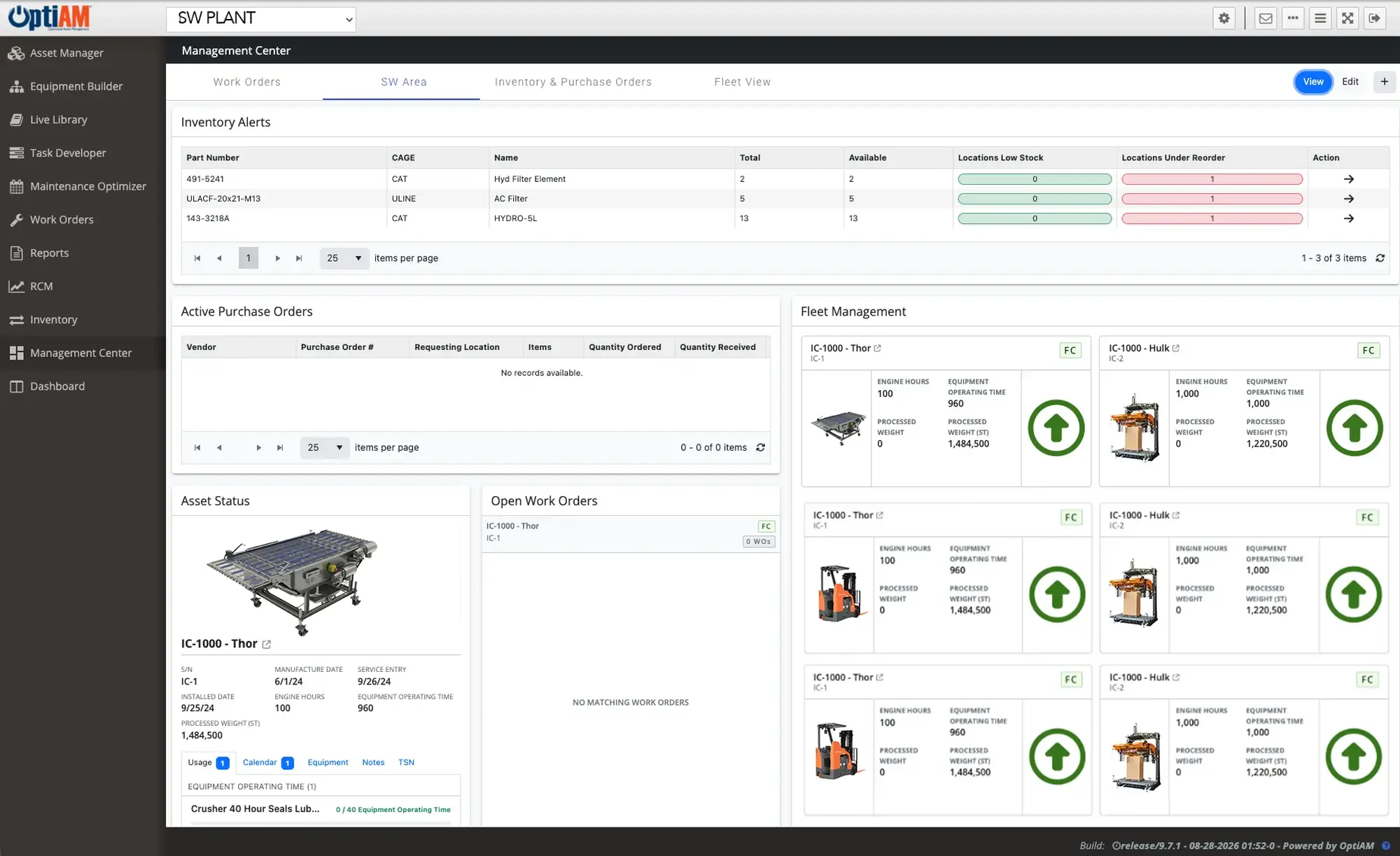
Management Center pulls equipment status, upcoming maintenance, open work orders, active purchase orders and inventory alerts onto one screen. You choose the widgets, move them, resize them and name them, so a maintenance manager and a technician each get the view their job actually needs. The data is live: change something in another OptiAM module and it shows up here immediately.
Proven reliability methods, without the enterprise price tag. Runs on any device, online or off. ASI guides implementation and user training, so most teams are live in weeks, not months.
The OptiAM platform
A Backlog You Cannot See Is a Backlog You Cannot Plan
Most teams find out what was due when something fails, or when an inspector asks. The work was scheduled. It was in the system. Nobody was looking at the right screen at the right time, and by the time it surfaced it was already late.
Reports tell you what already happened
A monthly report is a rear-view mirror. It shows the PMs you missed, not the ones coming due next week while you still have time to plan them.
The schedule lives in one person’s head
When only the planner knows what is coming, the backlog stops moving the week they are out, because nobody else can see it to pick it up.
Status and stock sit in different screens
Checking whether the part is on the shelf means leaving the screen that told you the job was due, so the two rarely get looked at together.
One Dashboard for Status, Work, Parts and Purchasing
Management Center is a widget dashboard inside OptiAM. It does not hold its own data. It displays what already lives in Asset Manager, Work Orders, Maintenance Optimizer and Inventory, which is why it is live: change something in another module and it shows here immediately. Every user builds their own dashboard from the available widgets and it saves to their login, so managers and maintainers are not fighting over one shared screen.
Add a widget, drag it where you want it, stretch it, rename it. The layout saves to your login.
Pick Your Widgets, Move Them, Name Them
Management Center ships with ready-made widgets rather than a fixed layout. Add the ones you want, drag them where you want them, resize them, rename them, and set the display options each one offers. Most people comfortable with a computer have a working dashboard inside a few minutes, without a ticket to IT or a call to us.
Live Data, and a Different View for Every Person
Management Center is a display layer, not a copy of your database. When a technician closes a work order or a part gets received, the relevant widget reflects it immediately, because it is reading the same records the rest of OptiAM writes to. And because each dashboard saves to the user, a plant manager watching a whole site and a planner watching one line each keep their own screen.
What ends up on the screen also changes by operation. The widgets a quarry wants are not the ones a food and beverage plant or a facilities team wants, which is why the person using the dashboard is the one who builds it.
What You Can Put on a Dashboard
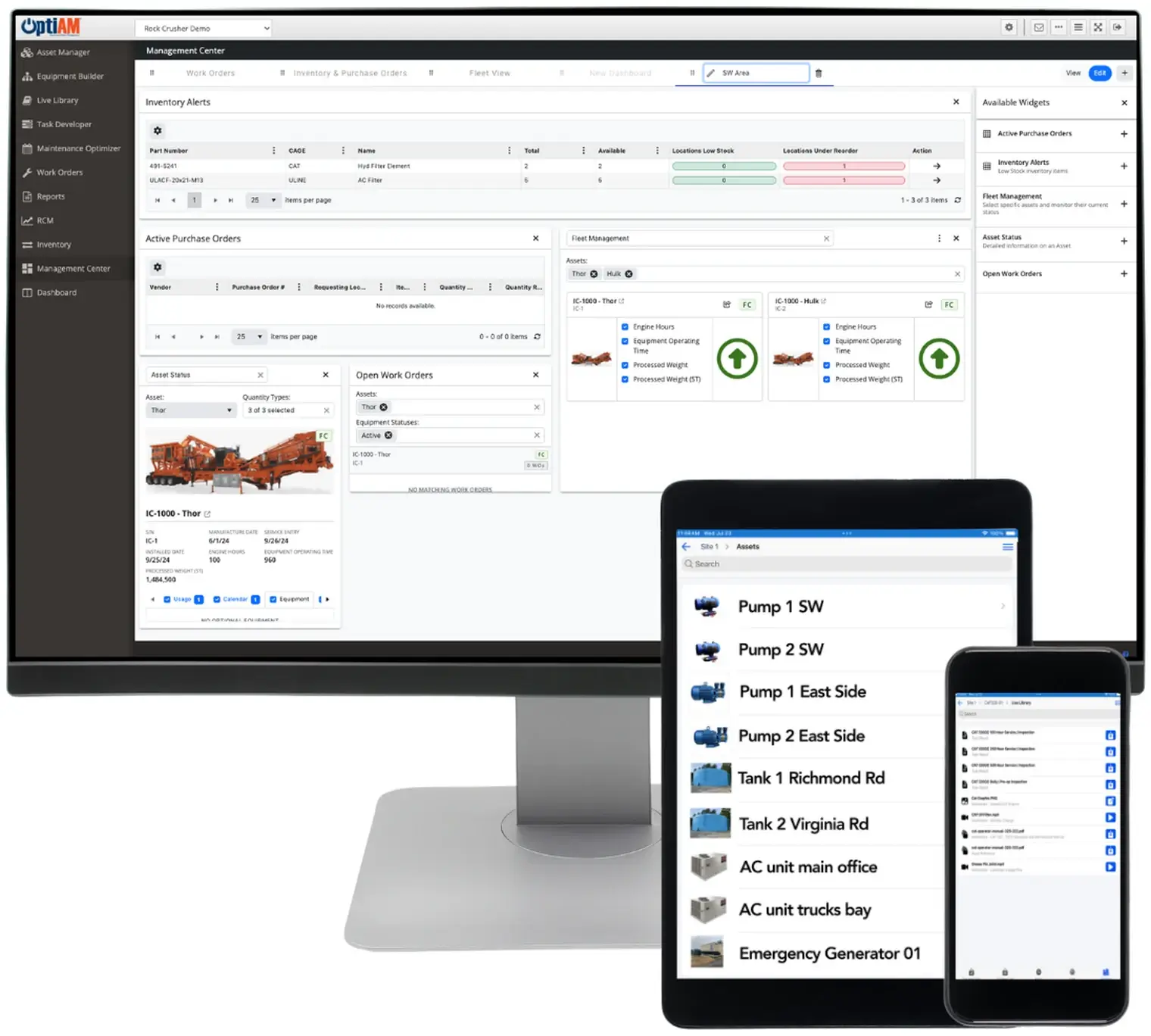
Management Center gives you a library of ready-made widgets. You decide which ones go on your dashboard and how they are arranged.
Equipment Status
Groups of equipment or a single asset, with the detail behind it: identity, service history and the maintenance coming due
Work and Purchasing
Open work orders and active purchase orders, so what is already in flight sits next to what is coming
Inventory Alerts
Stock positions and alerts, so a parts shortage surfaces on the same screen as the job that needs the part
Not sure which of these your team would actually use? That is the fastest thing to answer on a call.
At a Glance
What Management Center Does
Ready-Made Widgets
Start from a library, not a blank canvas. Add the widgets you want and arrange them. There is no dashboard to code, no template to request and nothing to wait on.
Live, Not Refreshed
The data is the data. Management Center displays records held in the other OptiAM modules, so a change made anywhere in the system shows here immediately.
A Dashboard Per Person
Managers and maintainers want different screens. Each user builds and saves their own, so nobody has to compromise on one shared layout.
Any Slice of the Fleet
One site, one region, or everything. Choose which assets appear on each dashboard, and keep separate dashboards for separate parts of the operation.
Asset Detail Where You Need It
Drill into the equipment, not out to another screen. Individual asset widgets carry the identifying information and the maintenance coming due on that asset.
Set Up in Minutes
No admin, no implementation ticket. Most people comfortable with a computer build a working dashboard on their own the first time they open it.
See What Monday Morning Would Look Like
Book a 30-minute demo. We will build a dashboard with equipment like yours and show you exactly what your team would be looking at on Monday morning.
A short call so we understand your operation
A walkthrough on equipment like yours
A rollout plan that has you live in weeks
Common Questions
What is maintenance dashboard software?
It is a screen that shows the current state of your equipment and the work around it, read live from your maintenance system instead of assembled into a report. The useful ones put status, open work, purchasing and parts together, so you can see what needs attention without opening three other tools first.
How is Management Center different from a report?
A report is generated, a dashboard is live. Reports tell you what already happened, usually on a cycle, which makes them a review tool. Management Center shows the current state right now, which makes it a monitoring tool. They are genuinely different jobs, and OptiAM handles reporting in its own module rather than inside this one.
What can you put on a dashboard?
Ready-made widgets covering equipment status for groups of assets, detail on an individual asset, open work orders, active purchase orders and inventory alerts. You choose which ones appear, then move, resize and rename them, and set whatever display options each widget offers.
Who sets the dashboard up, and how long does it take?
The end user does, not an admin and not us. Most people comfortable with a computer have a working dashboard within minutes of opening it for the first time. Anyone who wants a hand gets one, but it is not an implementation task.
Are there prebuilt dashboards out of the box?
No, and that is deliberate. Every user builds their own dashboard from the widget library, because a maintenance manager and a technician want to look at different things. Once a dashboard is built it saves to that user and stays put until they change it.
How real time is the data?
Immediate. Management Center does not keep its own copy of anything, it displays records that live in the other OptiAM modules. Update something in Work Orders or Inventory and the relevant widget reflects it straight away.
How fast can we get OptiAM running?
Weeks, not months. You bring the asset list, we handle the build and walk your team through it. If your data lives in spreadsheets, binders, or another system, that is normal. Getting it into shape is part of getting started, not something you have to finish first.
What does OptiAM cost?
Pricing is based on what you are managing, mainly the number of assets and the number of facilities you bring in. Adding people to a dashboard does not change the price, so a manager and six technicians can each keep their own view without it costing you more. If you want to check that against what reactive maintenance is costing you today, run the savings calculator. For a real number on your operation, the demo call is where we scope it.
Can I schedule a report or export data from it?
No. Management Center is built for viewing live data, not for reporting or exporting it. Scheduled reports, exports and printable output are a separate job and OptiAM handles them in its reporting module rather than here.
Does it work on a phone or tablet?
Management Center runs in a browser, so it is normally used on a laptop or desktop. It is not part of OptiAM GO, which is the separate offline app your technicians use in the field.
Is OptiAM cloud-based or installed?
Either. OptiAM runs as SaaS or installed on your own infrastructure, so it works for operations with strict IT or security requirements as well as for teams that would rather not run another server.
How is OptiAM different from a generic CMMS?
Most CMMS tools give you a work-order log and a monthly report. OptiAM is built on Reliability Centered Maintenance and Supportability Analysis, so it looks at how your assets actually fail and tells you what to maintain, how often, and what it costs you to get it wrong. Management Center is where that analysis becomes something your team can act on before the shift starts.
See It on Your Own Equipment
Management Center looks different in a quarry than it does in a hospital, because the assets and the widgets you choose are different. If you want to see the version built for your operation, start with your industry: manufacturing and plants, food and beverage, energy and utilities, mining and aggregates, facilities, or landscaping.
See Management Center on Your Assets
Tell us about your operation and we will set up a 30-minute walkthrough.
"*" indicates required fields