
Hardware Builder
Asset Hierarchy Software That Shows What Goes Where
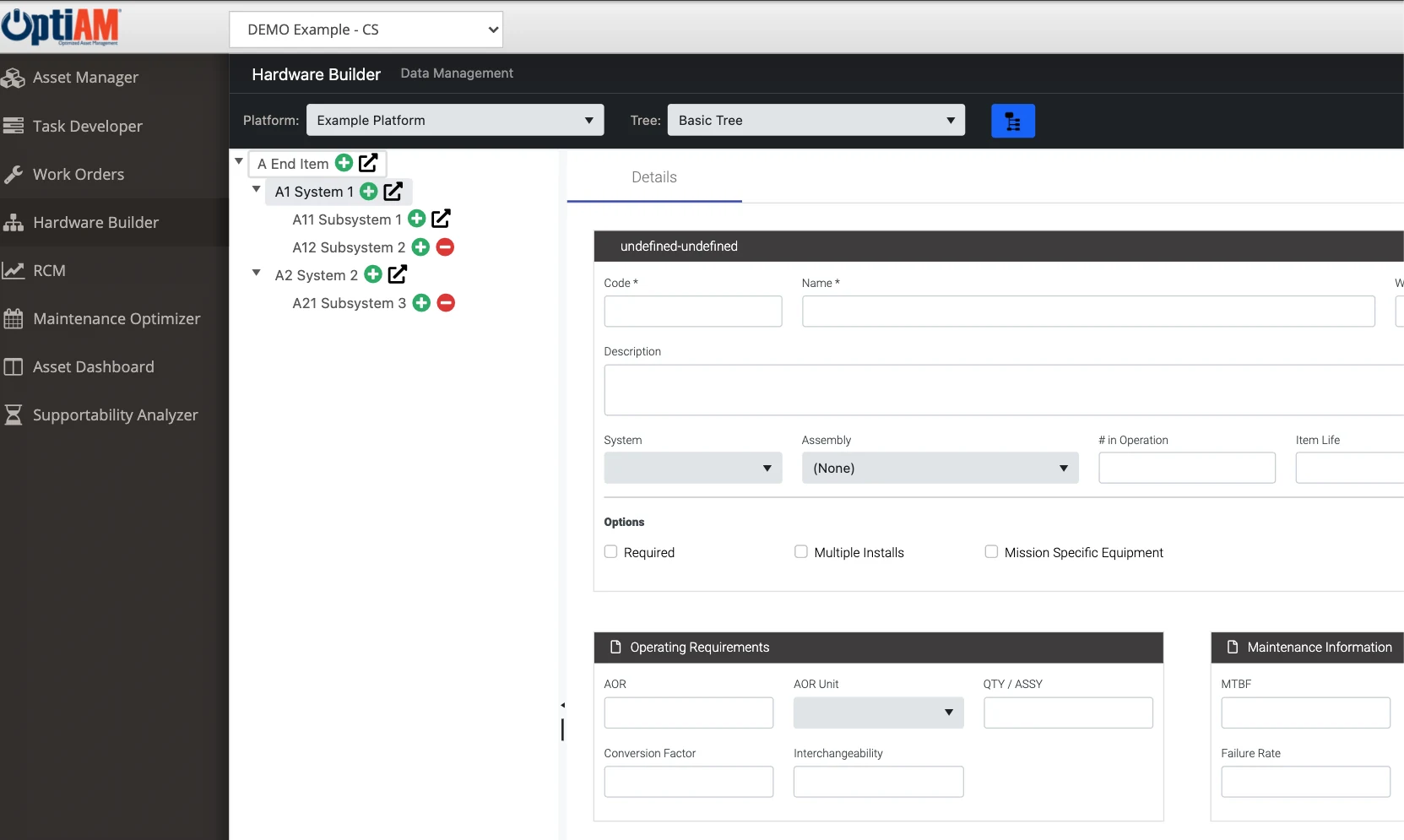
Hardware Builder breaks each piece of equipment into its systems, assemblies and components, as deep as you need to go. At every point in that breakdown you define which manufacturers and part numbers are acceptable, so the right part gets ordered, installed and tracked.
The OptiAM platform
When the Parts Book Lives in Someone’s Head
Most maintenance systems know you own the machine. Very few know what is inside it.
The wrong part gets ordered. A tech copies a part number off an old work order. It was for the previous model, and the machine sits until the right one shows up.
Every asset is one flat record. The registry says you own the truck. It says nothing about the engine, the fuel system or the filter, so component history has nowhere to live.
Approved alternates are tribal knowledge. Which substitutes are acceptable lives in one planner’s memory, and it leaves when they do.
Primary Crusher CR-2
Breakdown views
Levels deep
Same equipment, organized by what it has to do.
Physical and Functional Breakdowns, as Deep as You Need
Hardware Builder defines both the physical and the functional hierarchy of your equipment. The physical view is what the machine is made of, from the asset down through its systems, assemblies and components. The functional view is what it has to do.
You decide how much detail each one carries. Break a pickup down to a handful of major systems, and take the crusher that runs your whole line all the way down to its bearings.
Acceptable Parts Defined at Every Node
For each point in the breakdown, Hardware Builder defines the acceptable manufacturers and the part numbered components that can be installed there. The OEM part and the approved alternates sit on the node they belong to, not in a binder or a planner’s memory.
So when a tech needs a fuel filter for HT-07, the answer is attached to HT-07’s fuel system, not buried in a work order from two years ago.
HT-07 › Powertrain › Engine › Fuel System
Fuel Filter
Acceptable manufacturers and part numbers
Saved to Fuel Filter · 3 acceptable parts
Hardware Builder
Fuel Filter
HT-07 › Engine › Fuel System
Inventory Manager
Parts on the shelf tied to the equipment they fit
Asset Manager
Installed components and the history of every change
RCM Analyzer
Failure modes worked from the same breakdown
One Breakdown the Rest of OptiAM Works From
Hardware Builder is the structure the other modules hang their data on. Inventory Manager ties parts on the shelf to the equipment they belong on. Asset Manager records the components installed on each asset and the history of every change. RCM Analyzer starts from the hardware hierarchy and works down to failure modes.
Build the breakdown once, and every module works from the same picture of your equipment.
Start With the Equipment That Hurts Most
You do not have to break down every asset on day one. Start with the machines that stop production or cost the most when they go down, go as deep as those justify, and add detail to the rest over time.
At a Glance
What Hardware Builder Does
Physical hierarchies. Break each asset into its systems, assemblies and components.
Functional hierarchies. Organize equipment by what it has to do, alongside what it is made of.
As deep as you need. Stop at major systems or go down to individual components. Your call.
Acceptable manufacturers. Define which manufacturers are acceptable at each point in the breakdown.
Part numbered components. The OEM part and approved alternates, stored on the node where they get installed.
Shared across the platform. Inventory Manager, Asset Manager and RCM Analyzer all work from the same breakdown.
See One of Your Machines Broken Down
Bring one asset that eats parts or downtime, and we will walk through what its breakdown and acceptable parts would look like in OptiAM.
Common Questions
What is asset hierarchy software?
Asset hierarchy software organizes equipment into parent and child items, from the whole asset down through its systems, assemblies and components. It gives maintenance a shared map of what each machine is made of, so parts, work and history get recorded against the right piece. In OptiAM, that job belongs to Hardware Builder.
What is the difference between a physical and a functional hierarchy?
A physical hierarchy follows what the equipment is made of: the truck, its powertrain, the engine, the fuel system, the filter. A functional hierarchy follows what the equipment has to do, such as transmitting power or reducing rock to size. Hardware Builder defines both.
How deep can a breakdown go?
As deep as is useful to you. Hardware Builder lets you break equipment down in as much or as little detail as you want, so a critical asset can go all the way to individual components while simpler equipment stops at its major systems.
What does acceptable manufacturers and part numbers mean?
For each node in the breakdown, you record which manufacturers are acceptable and which part numbered components can be installed there. The OEM part and any approved alternates live on the node they belong to, so whoever orders or installs the part is working from the same list.
How does Hardware Builder connect to inventory?
Inventory Manager works alongside Hardware Builder and Asset Manager. That is what ties a part sitting in the storeroom to the equipment it actually belongs on, so the right part gets ordered and the wrong one does not get bought twice.
How is Hardware Builder different from Asset Manager?
Asset Manager is the equipment registry: what you have, where it is, who is responsible for it and its history. Hardware Builder defines how that equipment breaks down and which parts are acceptable at each point. Asset Manager then records the components actually installed on each asset and the history of component changes.
Where does RCM Analyzer fit in?
RCM Analyzer starts from the hardware hierarchy and works down to failure modes, so the breakdown you build in Hardware Builder is where a reliability analysis begins.
Does it work for fleets as well as plant equipment?
Yes. Production equipment, fleet vehicles and facility assets all live in the same OptiAM registry, and Hardware Builder can break down whichever of them you need, in as much detail as is useful.
Do we have to break down every asset before we go live?
No. You decide how much detail to build, so most teams start with the equipment that costs them the most when it goes down and add detail to the rest over time.
How long does implementation take?
OptiAM is designed to be implemented quickly, in weeks rather than months, and supports an unlimited number of locations and assets. The timeline depends mostly on how much asset, parts and equipment breakdown data you are bringing across, which is the first thing we scope on a call.
Is OptiAM available as SaaS or installed?
Both. The SaaS option is hosted in a professionally managed facility with redundant power, fire suppression, redundant tier 1 internet access and biometric physical access control, and we handle the licensing. The installed option runs in your own infrastructure on Microsoft Windows Server 2016 or later with IIS v10 or later, .NET Framework 4 or later and Microsoft SQL Server 2016 or later, with backups handled by your IT department.
Is OptiAM FedRAMP compliant?
Yes. OptiAM is FedRAMP compliant, and the platform uses a flexible role-based security model that can support any organizational structure.
Which standards does OptiAM support?
The architecture is standards based and supports compliance with SAE JA1011, SAE GEIA-STD-0007, SAE TA-STD-0017, ISO-55000 and the ASD S-Series IPS specifications.
See It in Your Own Operation
A haul truck, a packaging line and a rooftop unit break down very differently. To see how OptiAM fits the equipment you run, start with your industry: fleets, manufacturing and plants, aggregates and mining, food and beverage, energy and utilities, facilities, government and public works, schools and higher education, healthcare, landscaping or farming and agriculture.
See Hardware Builder on Your Equipment
Tell us which equipment you would break down first and how you keep track of its parts today, and we will set up a 30-minute walkthrough.
"*" indicates required fields