
Maintenance Optimizer
Preventive Maintenance Software That Schedules on Usage, Not the Calendar
Maintenance Optimizer builds the schedule around how each asset is actually used and the environment it works in, with the objective set to minimize either downtime or cost. Tasks can run on their own or bundled into maintenance packages, and when a usage reading crosses the interval you set, the work order opens itself.
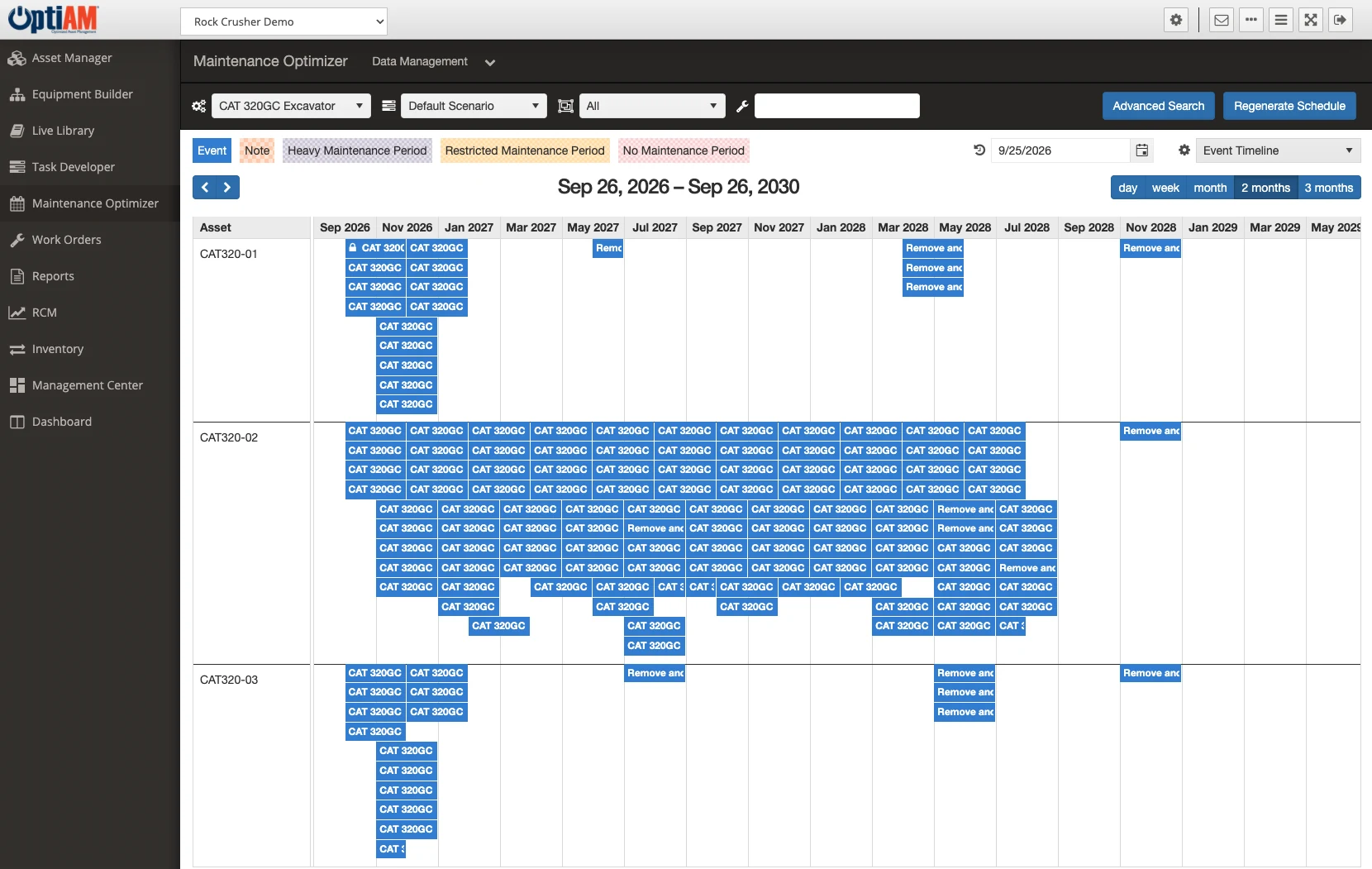
The OptiAM platform
A Calendar Does Not Know How Hard the Machine Worked
Most PM programs are built on dates because dates are easy to administer. The equipment does not run on dates.
Every machine gets the same interval. The pump running around the clock and the one that idles half the month are both on a 90-day PM. You are over-servicing one and under-servicing the other, and paying for both.
The same asset comes down three times a month. Related tasks are scheduled separately, so equipment gets pulled out of production again and again for work that could have been done in a single visit.
Usage never reaches the schedule. Hours and miles get written on a clipboard, and nobody compares them to the interval until the machine is already overdue.
Interval planner
Two identical loaders on the same service plan
Loader L-4
Two shifts, quarry dust
Services this year: 4
Services this year: 6
Jan
Feb
Mar
Apr
May
Jun
Jul
Aug
Sep
Oct
Nov
Dec
Loader L-5
One shift, paved yard
Services this year: 4
Services this year: 3
Jan
Feb
Mar
Apr
May
Jun
Jul
Aug
Sep
Oct
Nov
Dec
Same machine, same plan. The interval follows the hours, not the date.
Scheduling Driven by Usage and Environment
Maintenance Optimizer schedules maintenance based on individual asset usage and the environment the asset works in, rather than on a fixed date. Two identical machines that work very differently end up with intervals that reflect what they actually did.
You also decide what the schedule is solving for. The scheduling functions are built to minimize either downtime or cost, so that objective is a choice you make rather than one the software makes for you.
Group the Work So the Asset Comes Down Once
Tasks can be managed individually or as part of maintenance packages. The advanced scheduling optimization options work to minimize downtime and repetitive work effort, so related tasks land together instead of pulling the same machine offline three separate times in a month.
Task Developer is where those procedures and their required resources are defined and grouped into packages in the first place.
Conveyor C-3
Scheduled work this month
Times offline this month
3
1
Week 1
Week 2
Week 3
Week 4
C-3 monthly package
3 tasks
Related tasks land together, so the conveyor comes down once for all three.
Asset
Haul Truck HT-07
Engine hours
4,862
4,915
4,968
5,001
Service every 5,000 hours
Threshold reachedTriggered by the usage reading. Nobody had to raise it.
Work Order Manager
Open work orders
WO-3108 · 5,000-hour service
Haul Truck HT-07 · Open
WO-3104 · Brake inspection
Loader L-5 · Open
WO-3101 · Belt replacement
Conveyor C-3 · In work
WO-3097 · Bearing lubrication
Crusher CR-2 · In work
Triggers That Open the Work Order For You
You set the usage threshold that matters for each asset, whether that is hours, miles or another reading you track. When a reading crosses the line you drew, the work order is created automatically instead of waiting on somebody to notice. Calendar-based tasks raise their work orders the same way when they come due.
Those orders land in Work Order Manager ready to be assigned, worked and signed off, which closes the gap between a machine coming due and somebody being assigned to it.
One Schedule, Every Asset on Its Own Clock
Every asset sits on the same schedule, showing what it is serviced against, how much it has run since its last service and when it is next due. Because intervals follow usage, two identical pumps on the same plan end up with different dates, and the one working hardest comes due first.
When a machine reaches its interval, the work order opens on its own, so the schedule and the work stay in step.
PM schedule
Optimize for: downtime
Asset
Usage since last service
Interval
Next due
Pump PU-101
Runs around the clock
Every 500 hrs
Oct 30
Oct 12
Pump PU-102
Standby unit
Every 500 hrs
Oct 30
Jan 8
Crusher CR-2
High-dust environment
Every 250 hrs
Oct 30
Oct 9
Due nowHaul Truck HT-07
Double shift
Every 10,000 mi
Oct 30
Nov 18
Work order opened automatically
WO-2417 · 250-hour service · Crusher CR-2
Not Only Maintenance Tasks
The same scheduling functions handle actions that have nothing to do with asset usage. Contract and warranty renewals, one-time bulletins and changes can all be scheduled, so the things that happen once and get forgotten live in the same system as the recurring work instead of on somebody’s calendar.
At a Glance
What Maintenance Optimizer Does
Schedules on usage and environment. Intervals follow how each individual asset is actually used and the conditions it works in, not a date on a calendar.
Optimizes for downtime or cost. You set which one the schedule is solving for, and the optimization options work toward it.
Individual tasks or maintenance packages. Group related work so the asset comes offline once instead of three times for jobs that could have been done together.
Triggers on usage thresholds. A meter reading crossing the threshold you set opens the work order, the same way a calendar task does when it comes due.
Generates work orders automatically. A fired trigger creates the order in Work Order Manager, ready to route and execute.
Schedules more than maintenance. Contract and warranty renewals, one-time bulletins and changes sit on the same schedule as recurring work.
See What Your PM Schedule Would Look Like
Bring an asset you service on a fixed interval, ideally one you suspect is over-serviced or under-serviced, and we will walk through how its schedule would be built on usage instead.
Common Questions
What is preventive maintenance software?
Preventive maintenance software decides when work on a piece of equipment should happen and raises it before something breaks. In OptiAM that is Maintenance Optimizer, which schedules maintenance based on individual asset usage and the environment the asset works in, with the objective set to minimize either downtime or cost.
How is usage-based scheduling different from calendar-based PM?
Calendar PM gives every asset the same interval regardless of what it did. Usage-based scheduling looks at how that individual asset has actually been used and the environment it has been working in, so a machine running continuously and an identical one that runs occasionally end up on different intervals.
Can we choose whether to optimize for downtime or for cost?
Yes. The scheduling functions are built to minimize down time or cost, and the advanced scheduling optimization options work toward the objective you set.
Can related tasks be scheduled together?
Yes. Maintenance tasks can be managed individually or as part of maintenance packages, and the optimization options are designed to minimize downtime and repetitive work effort, so related work can be brought together into one visit rather than spread across several.
Can work orders be generated automatically?
Yes. Work orders are created automatically when a scheduled task comes due or when a usage reading crosses the threshold you set for that asset. People can also raise requests that become work orders. Everything that gets created is managed and executed in Work Order Manager.
Does OptiAM do predictive maintenance?
Not in the sense of sensors predicting a failure. Today, work orders are triggered by schedules, usage thresholds and user requests. Pulling condition or sensor data in from monitoring systems would require development, so tell us what you run and we will give you a straight answer. If the question is which assets deserve condition-based tasks in the first place, that is what RCM Analyzer is for.
Can it schedule things other than maintenance tasks?
Yes. The scheduling functions also handle actions such as contract or warranty renewals and one-time bulletins and changes, so one-off items are tracked in the same place as recurring maintenance.
Where do the procedures for a scheduled task come from?
Task Developer builds the procedures and identifies the resources needed to perform preventive and corrective maintenance tasks, and groups those tasks into maintenance packages. It also creates the automated checklists used in the OptiAM GO mobile application.
What analysis does OptiAM support behind the maintenance program?
RCM Analyzer is the module for that. It walks your team through a reliability-centered maintenance analysis on an asset, compares failure management strategies on cost and downtime, and turns the decisions into maintenance tasks. ASI also offers RCM services if you want help running the first analysis.
How long does implementation take?
OptiAM is designed to be implemented quickly, in weeks rather than months, and supports an unlimited number of locations and assets. The timeline depends mostly on how much asset, usage and procedure data you are bringing across, which is the first thing we scope on a call.
Is OptiAM available as SaaS or installed?
Both. The SaaS option is hosted in a professionally managed facility with redundant power, fire suppression, redundant tier 1 internet access and biometric physical access control, and we handle the licensing. The installed option runs in your own infrastructure on Microsoft Windows Server 2016 or later with IIS v10 or later, .NET Framework 4 or later and Microsoft SQL Server 2016 or later, with backups handled by your IT department.
Is OptiAM FedRAMP compliant?
Yes. OptiAM is FedRAMP compliant, and the platform uses a flexible role-based security model that can support any organizational structure.
Which standards does OptiAM support?
The architecture is standards based and supports compliance with SAE JA1011, SAE GEIA-STD-0007, SAE TA-STD-0017, ISO-55000 and the ASD S-Series IPS specifications.
See It in Your Own Operation
What drives an interval is different in a quarry than it is in a school district, because the duty cycle and the environment are different. If you want to see the version built for your operation, start with your industry: fleets, manufacturing and plants, aggregates and mining, food and beverage, energy and utilities, facilities, government and public works, schools and higher education, healthcare, landscaping or farming and agriculture.
See Maintenance Optimizer on Your Schedule
Tell us how your PM intervals are set today and what you track usage against, and we will set up a 30-minute walkthrough.
"*" indicates required fields