
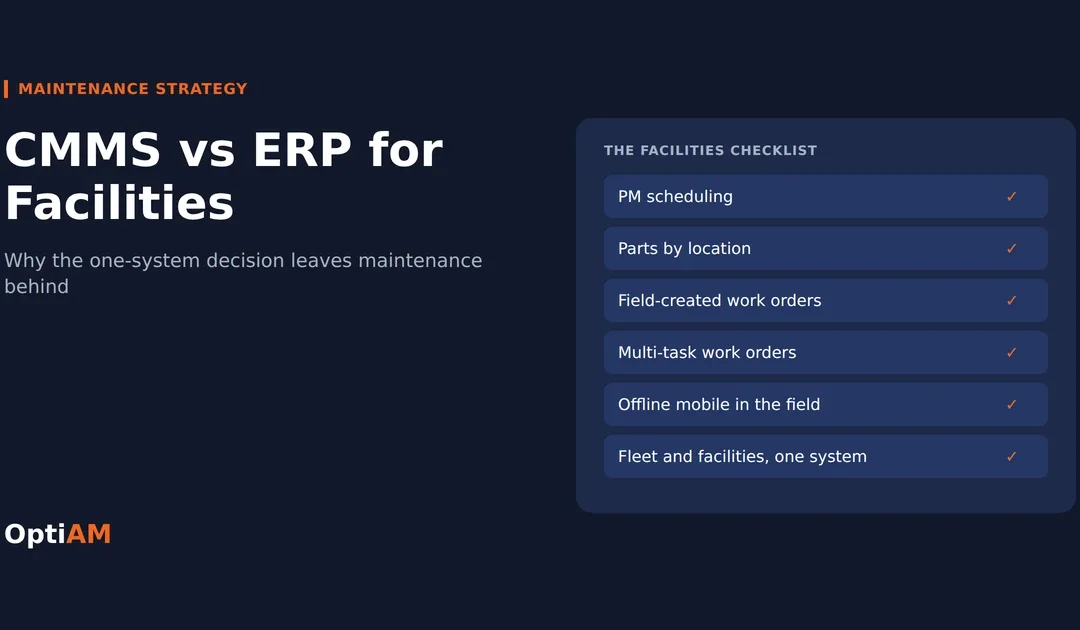
In the CMMS vs ERP debate, most facilities teams are better off with a dedicated CMMS. An ERP is built to track money: purchase orders, budgets and cost centers. Facilities maintenance runs on work: multi-trade jobs, PMs across dozens of buildings, parts pulled from a shop stockroom and hours logged by techs in the field. When one ERP gets picked for every division, facilities is usually the group that pays for it.
We heard that exact story this month from a fleet and facilities manager who just retired after more than 30 years running a city’s fleet and facilities operations. His take is worth passing on, because it matches what we hear from facilities directors at schools, hospitals, campuses and plants.
What happens when one system gets picked for everyone
His city ran its fleet on a purpose-built fleet management system for years. It worked, and it could have handled facilities assets and work orders too. Instead, public works leadership standardized every division except fleet on the city’s enterprise system.
His verdict on how that turned out for facilities: the enterprise system did a poor job with work orders and inventory, and plenty of other systems would have served the facilities group much better.
Nobody made a bad call on purpose. One system for every division looks clean from the top. One contract, one vendor, one login, one set of financial data. The catch is that the people signing off on it rarely run a work order, and the people running work orders rarely get a vote.
The pattern: the enterprise system gets picked at the top for everything. Fleet or another loud group fights for its own tool and wins. Facilities ends up with software that was never built for how the team works.
CMMS vs ERP: what’s the difference?
An ERP (enterprise resource planning) system runs the business side: finance, purchasing, payroll, HR and budgets. Many ERPs include a maintenance or asset module attached to that financial core.
A CMMS (computerized maintenance management system) is built for the maintenance work itself: work orders, preventive maintenance, parts and asset history, used every day by the techs and supervisors doing the work.
| ERP maintenance module | Dedicated CMMS | |
|---|---|---|
| Built for | Tracking money and transactions | Planning and doing maintenance work |
| Main users | Finance, purchasing, HR, admin | Techs, supervisors, planners |
| Work orders | Often a cost object for charging labor and parts | The center of the system, with tasks, status and sign-off |
| Parts | What was bought and paid for | What is on the shelf, where, and which job used it |
| Labor | Posted to timesheets, usually after the fact | Varies by system. Some log hours against each task, many do not |
| Field use | Desktop screens, and per-user licenses limit who gets a seat | Mobile, built for techs in mechanical rooms and on roofs |
| Who runs the rollout | IT and finance | Maintenance |
If you are weighing the other common comparison, we broke down CMMS vs EAM separately.
Why ERP maintenance modules struggle with facilities work
Facilities is a hard fit for a finance-first system because the work is so varied. One building can hold rooftop units, boilers, fire panels, elevators, backflow preventers and a standby generator, and a single job can pull in three trades.
1Work orders are too simple for multi-trade jobs
Replacing a rooftop unit is not one task. It is a crane lift, an electrical disconnect, controls work, startup and a filter change. Facilities teams need one work order that holds several tasks, each with its own tech, parts and hours. Many ERP modules treat a work order as a single line for charging costs, so the real job gets split across several orders or buried in notes.
2Inventory is built for purchasing, not the shop
An ERP knows what was bought. Facilities needs to know what is on the shelf in the shop, in the storeroom at each building and on the service truck, and which job used it. When the system cannot answer “do we have a belt for AHU-3,” techs build their own stash and the count stops matching reality.
3Labor shows up after the fact
In a finance system, labor usually lands as timesheet hours at the end of the week. That works for payroll. It does not tell you how many hours a job is actually taking, which buildings are eating your crew, or whether a trade would be cheaper to contract out.
4The people closest to the work cannot create it
Field techs and supervisors find most of the problems. If only a handful of licensed desk users can open work orders, the rest ends up on a clipboard or in someone’s head, and the backlog you can see is smaller than the backlog you have.
5PMs come second
Preventive maintenance by calendar, runtime or meter reading is core CMMS work. In a lot of ERP modules it is there but clunky, so PMs drift onto a spreadsheet and the ERP only ever sees the corrective work.
Is your system running maintenance, or just storing it?
The Maintenance Maturity Scorecard rates your program from reactive to reliability-driven and shows which gap to close first. It is also useful backup when you need to make the case upstairs.
Related: Work orders are where most ERP maintenance modules fall short. 10 reasons your company needs a work order system covers what a real work order process has to do.
What facilities teams actually need from maintenance software
We asked the retired manager what his facilities group would have needed if he had been the one choosing. His answer makes a solid buyer’s checklist:
- PM scheduling by calendar, runtime or meter, across every building
- Parts and inventory tracking by location, tied to the jobs that used them
- Work orders that field staff and supervisors can create, not just a few desk users
- Multiple tasks on one work order, so a multi-trade job stays one job
- Parts and labor assigned to each task, so you know what every piece of the job cost
- Real-time labor tracking as the work happens, not rebuilt from timesheets
We would add one more: mobile that works offline. Mechanical rooms, basements, parking decks and roof access are where the signal dies, and that is where facilities work happens.
Take that list into every demo. Ask each vendor to show every item live on a real multi-trade job, not on a slide.
When an ERP maintenance module is good enough
It is not always the wrong answer. An ERP module can work if:
- Your maintenance is light and mostly reactive, with a small crew
- Most of your work is contracted out and you mainly track contracts and invoices
- Your ERP’s maintenance module is strong and your techs actually use it in the field
- Finance reporting is the main requirement and nobody needs asset-level history
If that describes you, get more out of what you already own before you buy anything. If your team is running PMs on spreadsheets and parts from memory, the module is not doing the job.
How to make the case when the decision is made above you
Facilities managers rarely get to pick the enterprise system. You can still change the outcome.
- Keep finance in the ERP. Do not pitch a replacement. Pitch a maintenance system for maintenance work, and let finance keep its numbers where they already live.
- Show the hidden backlog. Count the work living on clipboards, spreadsheets and text messages. That number is usually the most convincing slide you will have.
- Point to the exception that already exists. If fleet got its own system, the precedent is set. Facilities has as many assets and more trades.
- Pilot one building or one trade. A 60 to 90 day pilot with real PM completion and backlog numbers beats any vendor pitch.
- Score everything on the same list. Rate the ERP module and each alternative on the six must-haves above.
Where OptiAM fits
OptiAM is a CMMS and EAM for mixed operations, with fleets, plants and multi-site facilities on one platform. Against the facilities checklist, here is what it does today:
- Work Order Manager: work orders with multiple tasks, parts, photos and notes captured on the job, your own statuses and multi-level sign-off. A work order cannot close until every task is complete.
- Preventive maintenance: PMs on a schedule or a meter reading that create work orders automatically.
- Inventory Manager: parts by location, serialized and bulk, with parts used recorded on the work order and a flag when stock hits its reorder point.
- OptiAM GO: mobile work orders that keep working offline and sync when the signal comes back.
- One registry for fleet and facilities, so you do not end up running two systems side by side.
To be straight about the limits: OptiAM does not track labor hours and does not handle finance. It is not a timekeeping, payroll or budgeting system, and it does not replace your ERP. It runs the maintenance work itself: tasks, PMs, parts and sign-off. If labor tracking is on your must-have list, keep it in the system that handles it today and use OptiAM for the work.
Pricing starts at $500 a month and scales with assets and facilities rather than users, so every tech can be in the system. OptiAM is built by Andromeda Systems Incorporated, the reliability and supportability engineering team that has supported DoW assets since 2005.
See how it works for your buildings: OptiAM for facilities, government and public works, school facilities and fleets.
Key takeaways
- An ERP tracks money. A CMMS runs the work. Facilities maintenance needs the second one.
- One-system-for-everyone decisions usually hurt facilities most, because the work is multi-trade and spread across buildings.
- The six must-haves: PM scheduling, parts by location, field-created work orders, multi-task work orders, parts and labor per task, and real-time labor tracking.
- Keep finance in the ERP and pitch a maintenance system alongside it, backed by a pilot.
Bring your worst multi-trade job to a demo
We will walk it through OptiAM from the first work order to final sign-off in 20 minutes.
Book a demo →or call 904-402-8641
Frequently asked questions
Is a CMMS better than an ERP for maintenance?
For the maintenance work itself, usually yes. A CMMS is built around work orders, PMs, parts and asset history, and it is designed for the techs and supervisors who do the work. An ERP is built around finance and purchasing. Most organizations get the best result by keeping finance in the ERP and running maintenance in a CMMS.
Can a CMMS and an ERP work together?
Yes, and it is a common setup. The CMMS runs work orders, PMs, parts and asset history, while the ERP handles purchasing, payroll, labor costs and budgets. How much data moves between them depends on the systems. Ask any vendor which integrations are live with customers today and which would be custom work.
Why do facilities teams struggle with ERP maintenance modules?
Facilities work is multi-trade and spread across many buildings. ERP modules often treat a work order as a single cost line, track parts from a purchasing view instead of a shop view, post labor after the fact through timesheets, and limit who can create work. That pushes real work onto clipboards and spreadsheets.
What should facilities maintenance software include?
At minimum: PM scheduling by calendar, runtime or meter; parts and inventory tracking by location; work orders that field staff and supervisors can create; multiple tasks on one work order; parts and labor assigned to each task; real-time labor tracking; and mobile access that works offline in mechanical rooms and basements.
What is real-time labor tracking in a CMMS?
It means techs log time against the job, or against each task on the job, as they do the work instead of reconstructing it from a timesheet later. Supervisors can see how many hours an open job has taken, compare buildings and trades, and decide what to keep in-house versus contract out.
Should fleet and facilities run on separate systems?
They can, if each tool fits its team. The cost is two sets of data, two logins and no single view of maintenance spend. Many public works and campus teams prefer one platform that handles both. OptiAM keeps fleet vehicles and facility assets in the same registry.
Keep reading
CMMS vs EAM: What’s the Difference?Which one your operation actually needs, and the reliability layer most systems skip.10 Reasons Your Company Needs a Work Order SystemThe signs you have outgrown sticky notes and email, and what to look for in a system.7 Signs Your Maintenance Team Has Outgrown ExcelHow to tell when the spreadsheet is costing you more than it saves.