
OptiAM GO
A Mobile CMMS App That Still Works When the Signal Does Not
OptiAM GO puts the work order, the procedure and the technical data in the technician’s hand at the machine. It runs on Apple, Android and Windows devices, works offline or online over cellular or Wi-Fi, synchronizes work orders, and lets a technician complete electronic checklists and capture results at the point of performance instead of writing it all up hours later.
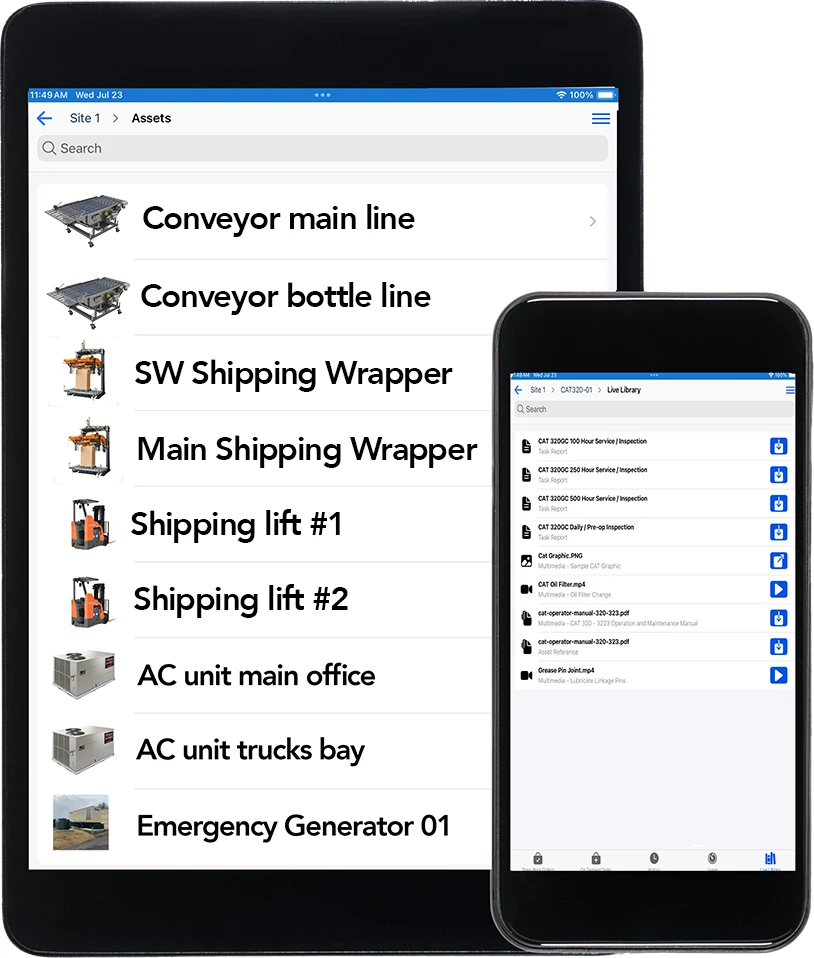
The OptiAM platform
The Job Happens at the Machine. The System Lives at a Desk.
Everything good about a maintenance system falls apart in the gap between where the work is done and where it gets recorded.
The record gets written twice. The technician works off a printout, marks it up, then walks back and keys it in at the end of the shift. Two versions of the truth, and an hour of the day gone to typing.
Details fade on the walk back. The reading, the part number, what was actually found. Written up from memory four hours later it comes out thinner and sometimes wrong, and that is the data your whole PM program gets built on.
The app dies where the work is. Basements, pump houses, remote sites, inside a tank. Most mobile tools quietly assume a connection, so the one place you need them is the one place they stop working.
Offline or Online, Cellular or Wi-Fi
OptiAM GO works offline or online over cellular or Wi-Fi. A technician does not have to check for bars before walking out, and you do not have to plan the day around where the coverage happens to be good.
Work orders synchronize with the system, so the work done out of range is not stranded on the device. This is the capability buyers ask about first, and it is the reason the rest of the app is usable in the places equipment actually fails.
Everything the Job Needs, Already in Hand
The app gives direct access to technical data at the point of performance. Work orders sync to the device, searchable technical resources come with them, and multimedia content including instructional videos is there too.
So the technician is not choosing between doing the job and understanding it. The manual, the procedure and the video that shows the awkward part are on the same screen as the work order.
Pick the Assets Before You Head Out
Before a technician leaves coverage, they choose the assets or asset groups they will be working on and download them to the device. The manuals, procedures and video attached to those assets go with them, so the documentation is there when the signal is not.
What gets stored on the device depends on what is selected, so a tech heading out to one line carries that line, not the whole library.
Checklists Completed Where the Work Happens
Electronic checklists built in Task Developer are completed directly on the mobile device, and results are captured at the point of performance rather than reconstructed at the end of the shift.
The record gets made while the person is still standing in front of the machine, which is the whole point. Accuracy is not a training problem, it is a distance problem, and this closes the distance.
Whatever Your Team Already Carries
OptiAM GO is compatible with all mobile devices, including Apple, Android and Windows platforms, so there is no fleet of special hardware to buy, standardize on and replace. Access follows the same flexible role-based security model as the rest of OptiAM, so what a person can see and do on a phone matches what they can see and do anywhere else.
Coming in OptiAM GO 1.6.0
Report a Problem From the Spot You Found It
OptiAM GO 1.6.0 adds service request submission to the app, alongside the new Service Request module in OptiAM 10.0.0. Describe the problem, set a priority, and attach a photo or document using the same request form people use on the web.
The request goes to an authorized reviewer to approve or reject. If maintenance is needed, it becomes a work order that carries the request details and keeps a link back to the original request, so nobody re-types what the person on the floor already reported.
At a Glance
What OptiAM GO Does
Works offline or online. Cellular, Wi-Fi or neither. The app does not stop being useful in a basement or at a remote site.
Apple, Android and Windows. Compatible with all mobile devices, so your team uses what it already carries.
Work orders synchronize. Work assigned on the system reaches the device, and what happens on the device comes back.
Downloaded before you go. Pick the assets or asset groups you need before heading out, and their documents travel with you offline.
Electronic checklists on the device. Complete the procedure and capture results at the point of performance, not at the end of the shift.
Technical resources and video. Searchable technical data plus multimedia content such as instructional videos, right where the job is.
Put It in Front of the People Who Would Use It
Tell us where your crews lose signal and how work gets recorded today, and we will walk through what a shift looks like with the work order, the procedure and the checklist all on one device.
Common Questions
What is a mobile CMMS app?
A mobile CMMS app puts the maintenance system on the device a technician carries, so work can be received, carried out and recorded at the equipment rather than at a desk afterwards. In OptiAM that is OptiAM GO, which provides direct access to technical data and lets people document work at the point of performance.
Does it work without a connection?
Yes. OptiAM GO works offline or online over cellular or Wi-Fi. This matters because the places equipment fails, basements, pump houses, tanks and remote sites, are usually the places with no coverage.
Which devices does it run on?
OptiAM GO is compatible with all mobile devices, including Apple, Android and Windows platforms. There is no separate hardware fleet to buy or standardize on.
What reaches the device?
OptiAM GO synchronizes work orders, delivers searchable technical resources and includes multimedia content such as instructional videos. The electronic checklists built in Task Developer come through as well.
Where do the checklists come from?
Task Developer creates the automated checklists used in OptiAM GO. It is also where the underlying procedures are written, revised and released, so what a technician follows on the device is the current released version.
Can I submit a service request from OptiAM GO?
Yes, starting with OptiAM GO 1.6.0, alongside the Service Request module coming in OptiAM 10.0.0. Requests use the same form as the web, with a description, a priority, requestor information and optional attachments such as photos or documents. An authorized reviewer then approves or rejects the request, and if maintenance is needed creates a work order linked to it.
Can they see manuals and video on the device?
Yes. OptiAM GO delivers searchable technical resources and multimedia content including instructional videos. Live Library is where that documentation is stored, associated with individual assets and classified so it can be found, with connected and disconnected access.
Is the Management Center dashboard available in the app?
No. Management Center is a laptop experience and is not part of OptiAM GO. The two do different jobs: the dashboard is for the person watching status across a group of assets, and OptiAM GO is for the person doing the work at the machine.
Who can see what on a device?
OptiAM uses a flexible role-based security model that can support any organizational structure, so what someone can see and do in the app follows the role they have been given.
How long does implementation take?
OptiAM is designed to be implemented quickly, in weeks rather than months, and supports an unlimited number of locations and assets. The timeline depends mostly on how much asset, procedure and stock data you are bringing across, which is the first thing we scope on a call.
Is OptiAM available as SaaS or installed?
Both. The SaaS option is hosted in a professionally managed facility with redundant power, fire suppression, redundant tier 1 internet access and biometric physical access control, and we handle the licensing. The installed option runs in your own infrastructure on Microsoft Windows Server 2016 or later with IIS v10 or later, .NET Framework 4 or later and Microsoft SQL Server 2016 or later, with backups handled by your IT department.
Is OptiAM FedRAMP compliant?
Yes. OptiAM is FedRAMP compliant, and the architecture is standards based, supporting compliance with SAE JA1011, SAE GEIA-STD-0007, SAE TA-STD-0017, ISO-55000 and the ASD S-Series IPS specifications.
See It in Your Own Operation
How far your crews get from a signal, and what they carry while they work, is different in a quarry than it is in a school district. If you want to see the version built for your operation, start with your industry: manufacturing and plants, aggregates and mining, food and beverage, energy and utilities, facilities, government and public works, schools and higher education, landscaping or farming and agriculture.
See OptiAM GO on Your Crew’s Devices
Tell us what your technicians carry today and where they lose signal, and we will set up a 30-minute walkthrough.
"*" indicates required fields