
Work Order Manager
Work Order Management Software Built for Jobs That Cross More Than One Crew
Work Order Manager is where maintenance work gets managed, executed and documented. Statuses are yours to define, sign-off can carry as many approval levels as your process requires, and a single job can carry subordinate work orders routed to different work centers, so a repair that touches three crews stays one job you can follow from open to close.
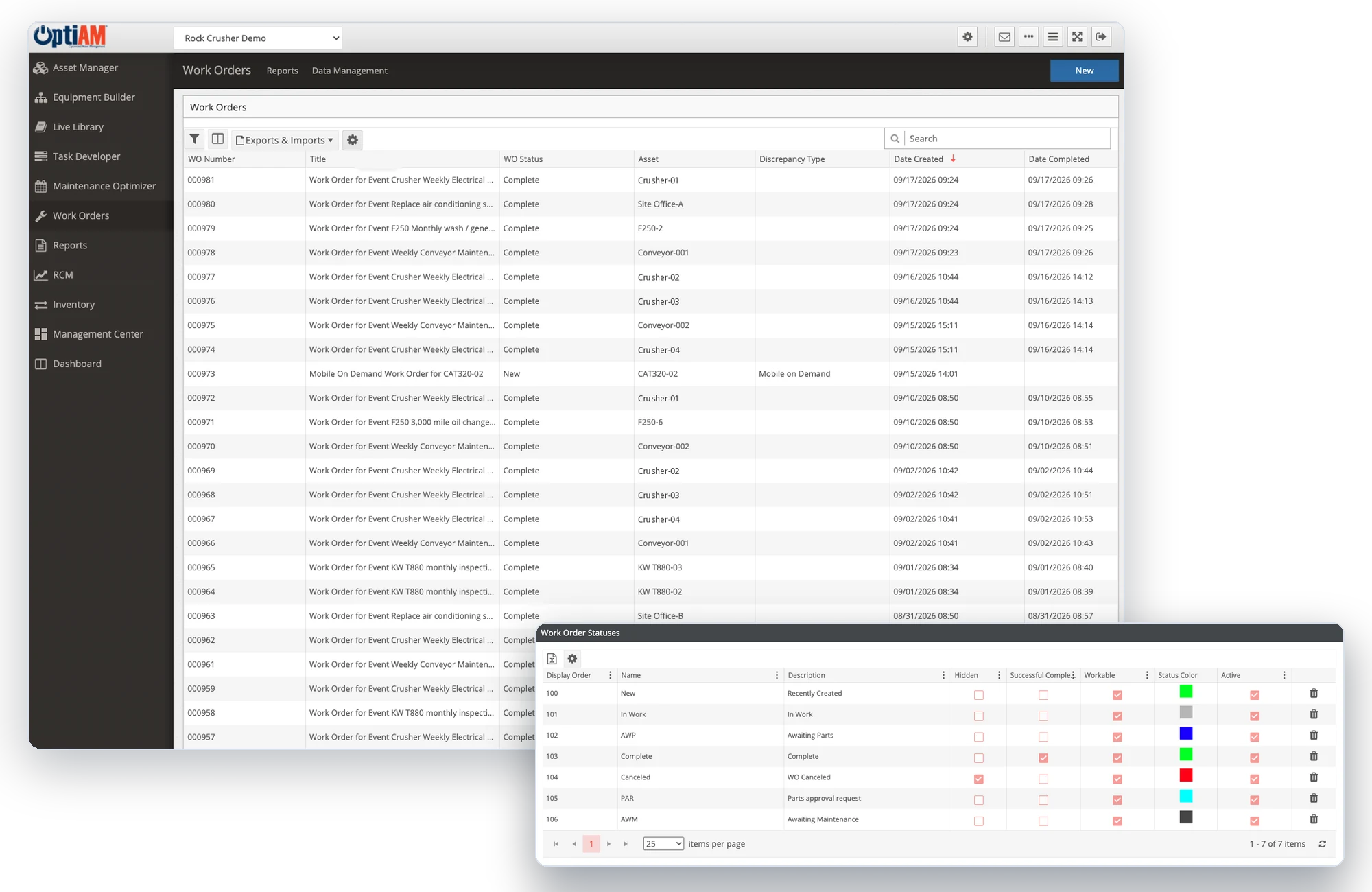
The OptiAM platform
Work Nobody Can Follow Is Work Nobody Can Finish
Most maintenance teams do not have a work order problem. They have a visibility problem, and it only shows up once the job is already late.
The job is bigger than one crew. One repair needs mechanics, electricians and an outside contractor. Split across three separate tickets, nobody owns the whole job and nobody can say how far along it really is.
Sign-off happens by walking around. Approvals sit in somebody’s inbox or on a clipboard. The work is finished, but the proof that it was inspected and accepted lives with whoever was on shift.
The record gets written after the fact. Technicians finish the job, then reconstruct it at the end of the day. Details get rounded off, and the history you would use to plan the next one comes out thinner than it should be.
As Many Sign-Off Levels as Your Process Needs
Work Order Manager handles multi-level sign-off without making you adopt somebody else’s idea of how approvals should run. Statuses are yours to name and manage, and sign-off can carry as many approval levels as you need, so a routine PM can close on one signature while a safety-critical job moves through inspection, quality assurance and maintenance control before it counts as done.
The sign-offs are part of the work order, so the proof travels with the record instead of living in a separate system. And a work order cannot close until every task on it is completed and a completion status is recorded.
One Job, Routed Across Multiple Work Centers
A controlling work order can carry subordinate work orders underneath it. That is how a job touching more than one work center stays a single job: each crew gets the piece of work that belongs to them, and the controlling order still shows where the whole thing stands.
It also keeps the history in one place. When you go back to see what that overhaul actually took, you are reading one record instead of stitching four tickets together.

Work Orders That Open Themselves
Maintenance Optimizer schedules against how each asset is actually used and the environment it works in. Work orders open automatically from PM schedules and from meter or usage thresholds, and a user can raise one directly when something breaks. Work Order Manager is where those orders land and get executed.
Tasks can be handled individually or as part of maintenance packages, so related work gets scheduled together instead of pulling the same machine down three separate times in a month.
Coming in OptiAM 10.0.0
From Reported Issue to Work Order, Without Re-Entry
The new Service Request module gives the people you authorize a structured way to report a problem or ask for service, from OptiAM on the web or from OptiAM GO 1.6.0 on a phone or tablet. Each request carries a description, a priority, requestor information and any photos or documents that help explain it.
Authorized reviewers approve or reject each request. When maintenance is needed, they create a work order from it, the relevant request details carry over, and the work order keeps a link back to the original request. When another action resolves the need, the approved request closes without a work order, so the outcome is still documented and nobody opens a maintenance record that was never needed.
The Work Order Goes Where the Work Happens
OptiAM GO syncs work orders to the device a technician is already carrying, on Apple, Android or Windows, and it works offline or online over cellular or Wi-Fi. Procedures built in Task Developer arrive as electronic checklists. Results are captured at the point of performance instead of written up later from memory.
At a Glance
What Work Order Manager Does
Manages, executes and documents the workload. One system to run maintenance work from the moment it is raised to the moment it is signed off and filed. The work order grid is searchable, filterable and sortable, and exports to Excel.
Multiple sign-off levels, with statuses you define. Match the approval path your process already requires instead of bending the process to the software.
Controlling and subordinate work orders. Route the pieces of one job to different work centers and still track it as a single job.
Automated work orders from triggers. PM schedules and meter or usage thresholds can open the order without anyone keying it in.
Procedures and checklists attached to the work. Task Developer builds the procedure and the electronic checklist that goes out with the order.
Mobile at the point of performance. OptiAM GO carries the order into the field, online or off.
See a Real Job From Raised to Signed Off
Bring a job your team ran recently, ideally one that crossed more than one crew, and we will walk through how it would have been raised, routed, signed off and recorded in OptiAM.
Common Questions
What is work order management software?
Work order management software is where maintenance work gets raised, assigned, carried out and recorded. It holds what needs doing, who is doing it, what procedure they should follow, what parts it takes and what happened when the job was finished. In OptiAM that is Work Order Manager, a full-featured work order system for managing, executing and documenting maintenance workload.
Not sure your team needs one yet? Read 10 reasons your company needs a work order system.
What is the difference between a controlling and a subordinate work order?
A controlling work order is the parent job. Subordinate work orders sit underneath it and carry the pieces that belong to different work centers. The crews each work their own order, and the controlling order still shows the status of the whole job, so a repair that touches mechanical, electrical and a contractor is tracked as one piece of work rather than three unrelated tickets.
Can we configure the approval workflow?
Yes. Work order statuses are yours to define and manage, and sign-off supports multiple approval levels, each with an approve or reject decision. A routine task can close on a single signature while a safety-critical or high-cost job runs through several levels of review before it is accepted as complete.
Can work orders be created automatically?
Yes. Work orders are created automatically from PM schedules and from meter or usage thresholds, and users can raise them directly. Maintenance Optimizer schedules that work based on individual asset usage and the environment the asset works in, rather than on a fixed calendar date.
Can people outside maintenance request work?
Yes, starting with the Service Request module coming in OptiAM 10.0.0. Users you authorize submit requests from OptiAM on the web or from OptiAM GO 1.6.0, with a description, priority, requestor information and attachments such as photos. Reviewers approve or reject each request, and when maintenance is needed they create a work order that carries the request details and keeps a link to the original request. Permissions control who can submit, view, approve and act on requests.
Can technicians work offline?
Yes. OptiAM GO works offline or online over cellular or Wi-Fi, and is compatible with Apple, Android and Windows devices. It syncs work orders, delivers searchable technical resources including instructional video, and lets technicians complete electronic checklists from the device.
How do procedures get attached to a work order?
Task Developer builds the procedures and identifies the resources a task needs, then groups tasks into maintenance packages. It also generates maintenance manuals, SOPs and emergency operating procedures with revision tracking and release control, and creates the automated checklists used in OptiAM GO. Live Library holds the wider technical documentation tied to each asset, available connected or disconnected.
Does it connect to parts and inventory?
Inventory Manager handles stock on an enterprise and location-by-location basis, covering both serialized assets and non-serialized bulk stock, with tools for purchase orders, receiving and adjustments. Users can view combined stock levels at any level of a location hierarchy and set reorder points per location.
How long does implementation take?
OptiAM is designed to be implemented quickly, in weeks rather than months, and supports an unlimited number of locations and assets. The exact timeline depends on how much asset and procedure data you are bringing across, which is the first thing we scope on a call.
Is OptiAM available as SaaS or installed?
Both. The SaaS option is hosted in a professionally managed facility with redundant power, fire suppression, redundant tier 1 internet access and biometric physical access control, and we manage the licensing. The installed option runs in your own infrastructure on Microsoft Windows Server 2016 or later with IIS v10 or later, .NET Framework 4 or later and Microsoft SQL Server 2016 or later, with backups handled by your IT department.
Is OptiAM FedRAMP compliant?
Yes. OptiAM is FedRAMP compliant, and the platform uses a flexible role-based security model that can support any organizational structure.
Which standards does OptiAM support?
The architecture is standards based and supports compliance with SAE JA1011, SAE GEIA-STD-0007, SAE TA-STD-0017, ISO-55000 and the ASD S-Series IPS specifications.
See It in Your Own Operation
How work gets raised and routed looks different in a quarry than it does in a school district, because the crews, the shifts and the sign-offs are different. If you want to see the version built for your operation, start with your industry: manufacturing and plants, aggregates and mining, food and beverage, energy and utilities, facilities, government and public works, schools and higher education, landscaping or farming and agriculture.
See Work Order Manager on Your Work
Tell us how work gets raised, routed and signed off today and we will set up a 30-minute walkthrough.
"*" indicates required fields