
Inventory Manager
Spare Parts Inventory Software That Knows What Is On the Shelf at Every Site
Inventory Manager handles stock at the enterprise level and location by location at the same time. It covers serialized assets and non-serialized bulk stock, shows combined stock levels at any level of your location hierarchy, and lets you set reorder points per location, so the site that burns through a part faster carries a reorder point that matches.
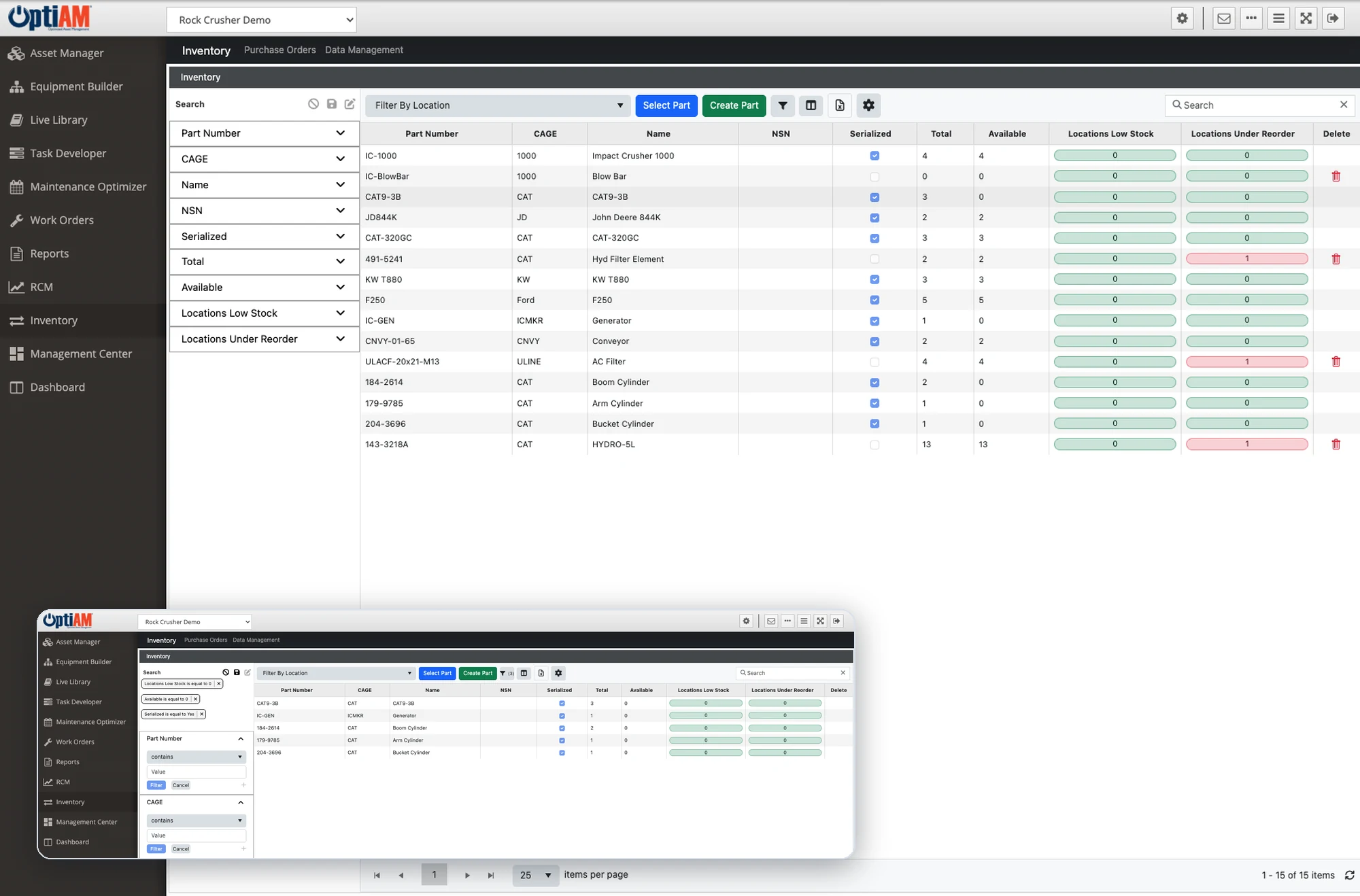
The OptiAM platform
The Part Is Either Missing or You Bought It Twice
Parts problems rarely look like parts problems. They show up as a machine sitting idle, or as a line on the budget nobody can explain.
Nobody trusts the count. The system says four on the shelf, the shelf says one. So the technician orders another to be safe, and the number drifts a little further from reality every time it happens.
One site is short while another is overstocked. Stock is tracked per location with no combined view, so the part somebody needs today is sitting two hundred miles away in a bin nobody thought to check.
Reorder points are one size fits all. The site running three shifts and the site running one get the same trigger, so one is always short and the other is holding cash on a shelf.

See Combined Stock at Any Level of the Hierarchy
Stock is managed on an enterprise basis and location by location at the same time. You can view combined stock levels at any level in a location hierarchy, so the same question works whether you are asking about one storeroom, one plant, a region or the whole business.
Stock can also transfer between locations, so that view is not just information. When one site is short and another is holding, the part moves instead of getting bought twice.
Reorder Points That Belong to the Location
Reorder points are defined per location rather than once for the whole company. The site that goes through a part every six weeks carries a level that matches, and the site that touches it twice a year does not sit on stock it does not need.
When stock falls below its reorder point the location is flagged, and inventory alerts surface on the Management Center dashboard next to open work orders and active purchase orders, so the person watching the floor sees the shortage in the same place as the work.
Serialized Assets and Bulk Stock in One System
Inventory Manager administers both serialized assets and non-serialized bulk stock. Serialized stock is tracked item by item by serial number, each with its own asset record in Asset Manager, like a spare electric motor you follow from the storeroom to the machine it is installed on. Bulk stock is tracked by quantity, like a bin of 100 identical bolts where issuing five leaves 95, with no separate record for each bolt. Both live in the same system, so nobody is running a second spreadsheet for half the storeroom.
It works alongside Hardware Builder and Asset Manager, and Hardware Builder is where acceptable manufacturers and part numbered components are defined for each node in the hardware breakdown. That is what ties a part on the shelf to the equipment it actually belongs on.
Purchase Orders, Receiving and Adjustments
Inventory Manager gives you tools to raise stock purchase orders, receive inventory against them and adjust inventory when the shelf and the system disagree. Each purchase order carries the vendor and the part cost, so what was ordered, from whom and at what price stays on the record. Active purchase orders show up on the Management Center dashboard, and stock changes and parts used on work orders are recorded against stock as they happen.
At a Glance
What Inventory Manager Does
Enterprise and location-by-location stock. Run the whole business and each individual location in one system, with combined stock levels at any level of the hierarchy.
Serialized assets and bulk stock. Track rotables by serial number and consumables by count without keeping a second system for half the storeroom.
Reorder points per location. Set the trigger where the part actually gets used instead of applying one threshold across every site.
Purchase orders, receiving and adjustments. Raise stock POs, receive against them, and correct the count when the shelf and the system do not agree.
Tied to the hardware it serves. Works with Hardware Builder and Asset Manager, so parts connect to the components and assets they belong on.
Transfers between sites. Move stock from the location that has it to the location that needs it, with one view of total stock across the enterprise.
See What Your Storeroom Looks Like in OptiAM
Bring a part you have run short on, or one you suspect you are holding too much of, and we will walk through how it would be stocked, triggered and reordered across your sites.
Common Questions
What is spare parts inventory software?
Spare parts inventory software tracks the parts and materials you hold to keep equipment running, where each one is stocked, how many you have and when to buy more. In OptiAM that is Inventory Manager, which manages stock on an enterprise and location-by-location basis and covers both serialized assets and non-serialized bulk stock.
Can we see stock across multiple sites?
Yes. Users can view combined stock levels at any level in a location hierarchy, so you can ask the same question of one storeroom, one plant, a region or the entire business. OptiAM supports an unlimited number of locations and assets.
Can reorder points be different for each location?
Yes. Reorder points are defined per location rather than once globally, so a site that consumes a part quickly can carry a different trigger than a site that barely touches it.
Does it handle serialized parts and bulk consumables?
Both. Inventory Manager supports administration of serialized assets and non-serialized bulk stocks in the same system, working alongside Hardware Builder and Asset Manager.
Can we raise and receive purchase orders in OptiAM?
Yes. Inventory Manager provides tools to manage stock purchase orders, receive inventory and adjust inventory as needed. Active purchase orders also appear as a widget on the Management Center dashboard.
Does Inventory Manager integrate with our ERP?
Purchase orders and receiving are handled inside OptiAM today. ERP integration is development work scoped case by case rather than an off-the-shelf connector, so bring your system to the call and we will tell you plainly what it would take.
How does inventory connect to maintenance work?
Task Developer identifies the resources a preventive or corrective task needs when the procedure is built. Work Order Manager runs the work itself, and parts used on work orders are recorded against stock. Inventory alerts show on the Management Center dashboard alongside open work orders.
Can stock transfer between sites?
Yes. Stock can transfer between locations, and there is a single view of total stock across the enterprise with the option to view it by site. That is how a surplus at one location covers a shortage at another instead of raising a new purchase order.
How does Inventory Manager relate to Hardware Builder and Asset Manager?
Hardware Builder defines the physical and functional hierarchies of your equipment, and for each node it defines the acceptable manufacturers and part numbered components that can be installed. Asset Manager holds the record for each asset including its installed components. Inventory Manager works with both, which is how the stock you hold connects to the equipment it serves.
How long does implementation take?
OptiAM is designed to be implemented quickly, in weeks rather than months, and supports an unlimited number of locations and assets. The timeline depends mostly on how much stock and hardware data you are bringing across, which is the first thing we scope on a call.
Is OptiAM available as SaaS or installed?
Both. The SaaS option is hosted in a professionally managed facility with redundant power, fire suppression, redundant tier 1 internet access and biometric physical access control, and we handle the licensing. The installed option runs in your own infrastructure on Microsoft Windows Server 2016 or later with IIS v10 or later, .NET Framework 4 or later and Microsoft SQL Server 2016 or later, with backups handled by your IT department.
Is OptiAM FedRAMP compliant?
Yes. OptiAM is FedRAMP compliant, and the platform uses a flexible role-based security model that can support any organizational structure.
Which standards does OptiAM support?
The architecture is standards based and supports compliance with SAE JA1011, SAE GEIA-STD-0007, SAE TA-STD-0017, ISO-55000 and the ASD S-Series IPS specifications.
See It in Your Own Operation
What sits on the shelf looks different in a quarry than it does in a school district, and so does how often you burn through it. If you want to see the version built for your operation, start with your industry: manufacturing and plants, aggregates and mining, food and beverage, energy and utilities, facilities, government and public works, schools and higher education, landscaping or farming and agriculture.
See Inventory Manager on Your Stock
Tell us how many sites you hold parts at and how you track them today, and we will set up a 30-minute walkthrough.
"*" indicates required fields

Contact us
Connect with us
Capabilities
Enterprise Asset Management (EAM)
Computerized Maintenance Management System (CMMS)
Preventive Maintenance
Analytics & Reporting