
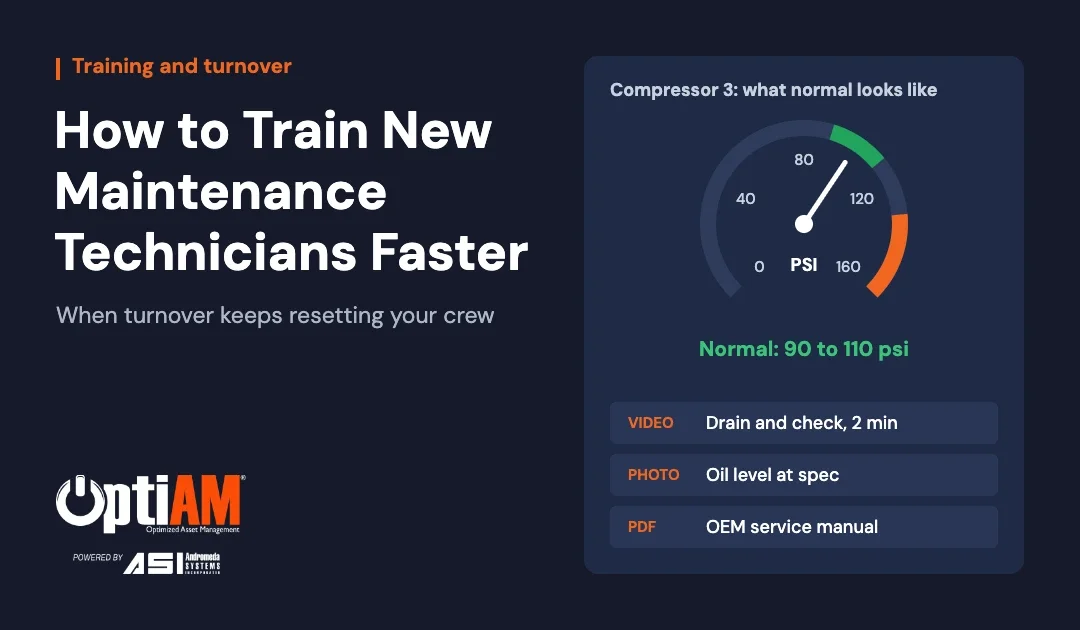
The fastest way to train a new maintenance technician is to stop making them learn from people who aren’t in the room. Put the manual, a photo of what normal looks like and a two-minute how-to video on the machine itself, so a new hire can pull it up standing at the asset, even with no signal. Every job becomes a guided job, and your best tech stops being the only one who knows how.
That matters more every year. Your veteran retires in March. The guy you hired to replace him leaves in June for two dollars more an hour. Now the newest person on the crew is standing in front of an air compressor, staring at a pressure gauge, with no idea whether that needle is fine or about to cost you a shift.
This guide covers why turnover hits maintenance so hard, the knowledge a new tech is actually missing, and a six-step system for getting new hires productive faster. It’s written for maintenance managers, plant managers and fleet managers who are tired of training the same job every six months.
The short version: new technicians rarely struggle because they can’t turn a wrench. They struggle because they don’t know which manual goes with this machine, what normal looks like, or the one trick the last guy knew. Capture those three things against each asset, make them reachable in the field, and ramp-up time drops.
Why technician turnover hits maintenance harder than other departments
Production can hand a new operator a checklist and a supervisor. Maintenance can’t, because almost every job is a little different, and most of what makes a good tech good was never written down.
The labor math isn’t getting easier. Deloitte and The Manufacturing Institute estimate U.S. manufacturers will need up to 3.8 million new workers between 2024 and 2033, and about 1.9 million of those jobs could go unfilled. Retirements alone drive roughly 2.8 million of the openings.
Fleets are in the same spot. The American Transportation Research Institute found that 65.5% of diesel repair shops were understaffed in 2025, with an average of 19.3% of technician positions sitting empty. Most techs (61.8%) start their careers without formal training, and getting an untrained hire up to speed takes an average of 357 training hours and $8,211 in trainee wages.
Every time someone quits, you pay that bill again. The part you can’t budget for is the knowledge that walks out with them.
What a new maintenance tech doesn’t know yet (and can’t Google)
Most new hires can learn the tools. What they can’t learn fast is your equipment. Here’s what they’re missing on day one:
- Which document belongs to this machine. You have manuals for a dozen models. Nobody told them which one matches the unit in front of them, so they guess or go find someone.
- What normal looks like. The right reading on a gauge, the right color of hydraulic fluid, the right level in a sight glass, how much track sag is too much. If you’ve never seen normal, you can’t spot abnormal.
- The sequence. The order of steps that keeps you from pulling the same part twice.
- The trick. The shim that has to go back in, the bolt that strips if you torque it dry, the filter you can only reach from underneath. This is the stuff that lives in one person’s head.
- Help when there’s no signal. Pump houses, basements, remote yards and the back of a job site are exactly where the questions come up.
None of that is in a generic training course. It’s specific to your assets, which is why it has to be captured against your assets.
The gauge problem: show new techs what good looks like
Every maintenance manager has lived some version of this. A new tech does his walkdown and logs every reading exactly like he was told. Two weeks later a pump fails, and the log shows discharge pressure drifting out of range for days. He wrote the numbers down. Nobody ever showed him what the number was supposed to be.
Experienced techs carry a mental picture of normal for every machine they touch. New techs don’t, and a spec buried on page 84 of an OEM manual won’t build that picture. A photo will.
A reference photo library is the cheapest training tool you’ll ever build. For each critical asset, shoot:
- Every gauge at normal operating range, with the acceptable range written in the caption
- Sight glasses and reservoirs at the correct level
- Fluid samples side by side: clean hydraulic oil next to oil that needs attention
- Belt tension, chain slack or track sag at spec. On an excavator, the track sag check is easy to get wrong the first time
- Wear parts at the replace-now point: brake pads, cutting edges, blades, tires at minimum tread
- Labeled shots of hard-to-find components: drain plugs, grease points, filters, isolation valves
Then attach those photos to the asset itself. When a new hire walks up to Compressor 3, the picture of what Compressor 3 should look like is a tap away, not in a binder back in the shop.
Rule of thumb: if your best tech would glance at it and know something’s wrong, photograph it the way it looks when it’s right.
How to train new maintenance technicians faster: a 6-step system
You don’t need a training department to do this. You need a phone, a few hours a week and one place to put what you capture.
1. Start with the 20 assets that generate the most questions
Don’t try to document the whole operation. Pull your work order history, or just ask your lead, and list the machines that break most, cost most when they’re down, or send new hires looking for help. That short list covers most of what a new tech touches in the first 90 days.
2. Record your veterans before their last day
Hand your most experienced tech a phone and ask him to film the jobs only he does well. One task per clip, two or three minutes each. Ask him to say out loud what he’s checking and why. A shaky phone video of a 25-year tech changing a fuel water separator on your truck is worth more than a polished course on filters in general.
3. Shoot the reference photos
Walk each critical asset once and photograph what good looks like: gauges, levels, tension, wear limits. Caption every photo with the number or condition it’s showing, so nobody has to interpret it.
4. Attach everything to the asset, not a folder
This is where most shops lose the gain. Videos end up in someone’s camera roll and photos on a shared drive nobody can find. Every manual, drawing, procedure, photo and video should live on the record for that specific machine, so the question becomes “what’s attached to this asset” instead of “which of these twelve files applies here.”
5. Make it reachable where the work happens
If a new tech has to walk back to the office to watch a video, he won’t. The documentation has to be on the device in his hand, and it has to work where there’s no signal. That means downloading what the job needs before he heads out, using a mobile CMMS app that works offline.
6. Pair it with ride-alongs and a sign-off
Content doesn’t replace a mentor. It makes the mentor’s time count. Have the new tech watch the video, do the job while a senior tech watches, then do it alone. Sign off each task once he’s competent, and you’ll know exactly who on your crew can do what.
How ready is your program for the next resignation?
The Maintenance Maturity Scorecard takes a few minutes. It scores your program on the basics that separate reactive shops from planned ones and shows where the gaps are.
Video, photos or written procedures: which should you use?
All of them. They do different jobs, and the mistake is picking one format for everything. A 40-page PDF can’t teach feel, and a video is a slow way to look up a torque spec.
| Format | Best for | Example |
|---|---|---|
| Short how-to video | Jobs where the sequence or the feel matters | Changing a fuel water separator, bleeding a hydraulic line, adjusting a belt |
| Reference photo | Knowing what normal looks like at a glance | Gauge at operating range, correct fluid level, wear limit on a cutting edge |
| Step-by-step procedure | Repeatable jobs where every step has to be done | PM inspections, lockout/tagout, pre-op checks |
| OEM manual | Specs, part numbers and service intervals | Filter part numbers, torque values, wiring diagrams |
How to capture a retiring technician’s knowledge
When someone gives notice, you have a few weeks to get what’s in their head. Use them well:
- Ask for their top five. The five machines they get called about most. Start there.
- Film every job on that list, including the ones that seem too simple to bother with.
- Ask what new people always get wrong on each machine, and record the answer.
- Have them check your reference photos and flag anything that isn’t actually normal.
- Have them teach one job out loud to a newer tech while you record. Teaching surfaces details nobody would ever write down.
Make this a standing habit instead of a retirement project, and turnover stops being an emergency.
Related: Training only sticks if the job history is written down somewhere. 10 reasons your company needs a work order system covers how work orders build that record.
When a binder and a shared drive are still fine
Not every team needs software for this. If you run one site with full cell coverage, a small stable crew and a handful of machines, a well-organized shared drive and a binder in the shop can work. Name folders by asset tag, keep one current manual per machine and store the videos in the same folder.
It breaks when you add sites, dead zones, a mixed fleet or steady turnover. That’s when “it’s on the drive somewhere” turns into a new hire standing at a machine with nothing to go on. If that sounds familiar, the 7 signs your team has outgrown spreadsheets are a good gut check.
How OptiAM Live Library gets new technicians up to speed
Live Library is OptiAM’s maintenance documentation module. It gives your team one place for equipment manuals, maintenance instructions, operating procedures, drawings, photos and instructional video, and attaches all of it to the specific asset it belongs to.
- Knowledge lives on the machine’s record. A new tech opens the asset and sees what’s attached: the manual, the reference photos, the how-to videos. No guessing which file applies.
- Video sits next to the written material, so your veteran’s two-minute clip is right beside the OEM manual.
- It’s searchable, PDFs included, so nobody has to remember where something was filed.
- It works offline. In OptiAM GO, techs pick the assets or asset groups they’re about to work on and download that documentation before they leave coverage. It stays on the device with no signal.
- You don’t start from scratch. We load your existing documentation during setup and train your team to manage it from there.
For the written side, Task Developer builds your step-by-step maintenance procedures, and both modules run on the same platform as your asset registry, work orders and preventive maintenance. It works the same way for a plant floor, a mixed fleet or a portfolio of buildings.
What it isn’t: Live Library isn’t a learning management system, and it doesn’t track course completions. It puts the right knowledge on the right machine, in front of the person working on it.
OptiAM is built by Andromeda Systems Incorporated, the reliability and supportability engineering team that has supported DoW assets since 2005. Keeping equipment ready while crews rotate in and out is the problem we’ve worked on for two decades.
Bring the machine your new hires ask about most
We’ll walk through how its manuals, reference photos and how-to videos would be attached to the asset and reached from the floor, including with no signal.
Book a demo →or call 904-402-8641
Frequently asked questions
How long does it take to train a new maintenance technician?
Longer than most shops plan for. ATRI’s 2025 research found that bringing an untrained diesel technician up to speed takes an average of 357 training hours and $8,211 in trainee wages, and most maintenance managers expect several months before a new hire works unsupervised on critical equipment. Asset-specific videos, reference photos and written procedures shorten that by letting new techs learn on the job instead of waiting for someone to show them.
What is maintenance knowledge transfer?
Maintenance knowledge transfer is capturing what experienced technicians know about your specific equipment, including the procedures, the normal readings and the tricks that never made it into the manual, and making it available to the people who come after them. Done well, a resignation doesn’t take your know-how out the door.
How do you capture tribal knowledge from a retiring technician?
Start with the five machines they get called about most. Film them doing each job in short two to three minute clips, ask what new people always get wrong, photograph what normal looks like on each machine, and attach all of it to the asset record so it’s found at the machine instead of in a folder.
Are videos better than written SOPs for maintenance training?
Neither is better on its own. Video teaches sequence and feel. Photos show what normal looks like at a glance. Written step-by-step procedures make sure every step gets done and signed off. OEM manuals hold the specs. The best training programs use all four and keep them on the same asset.
How can technicians access manuals without an internet connection?
Use a mobile maintenance app that downloads documentation to the device before the tech leaves coverage. In OptiAM GO, a technician picks the assets or asset groups they’re about to work on and downloads that documentation, which then stays on the device with no signal.
What should a new maintenance technician learn first?
Site safety and lockout/tagout first. Then the critical assets they’ll touch most, including what normal looks like on each one. Then your work order and preventive maintenance process. General mechanical skills come with time. Asset-specific knowledge is what slows new hires down.
Keep reading
10 Reasons Your Company Needs a Work Order SystemThe signs you have outgrown sticky notes and email, and what to look for in a system.7 Signs Your Maintenance Team Has Outgrown ExcelHow to tell when the spreadsheet is costing you more than it saves.CMMS vs EAM: What’s the Difference?Which one your operation actually needs, and the reliability layer most systems skip.