Live Library
Maintenance Documentation Software That Works Where the Signal Does Not
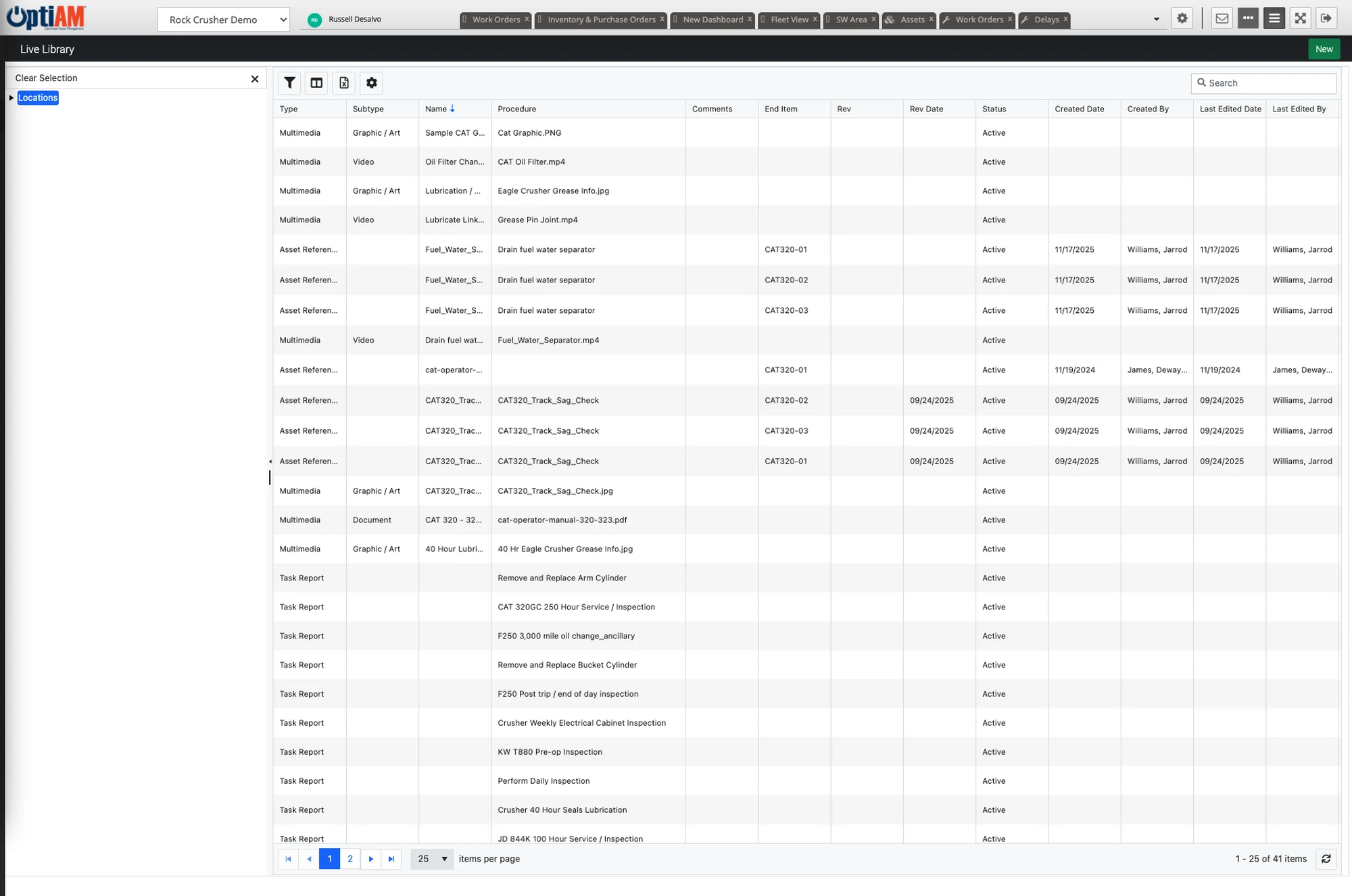
Live Library gives your team one place for the equipment manuals, maintenance instructions, operating procedures, photos and video that belong to your machines. Everything is attached to the specific asset and searchable, and through OptiAM GO technicians download what they need and carry it into places with no signal.
The OptiAM platform
The Manual Is Always Somewhere Else
Documentation is rarely missing. It is just never where the person who needs it is standing.
It is back in the office. The manual is in a filing cabinet or on a shared drive, and the technician is at the far end of the site with a machine open and no way to look anything up.
There is no signal where the work is. Basements, pump houses, remote sites and anything behind thick concrete. A cloud document viewer is useless the moment the bars disappear.
Nobody knows which document goes with this machine. You have manuals for a dozen models and no reliable way to tell which one belongs to the unit in front of you, so people guess or call someone.
Connected or Disconnected, at Any Location
Live Library provides connected and disconnected access to asset, maintenance and operating procedures and other documentation at any location. Before a crew heads somewhere without coverage, they download the assets or asset groups they will be working on in OptiAM GO, and that documentation stays on the device until they are back online.
That matters because the places equipment actually breaks, basements, pump houses and remote sites, are the places with the least signal.
Documentation Tied to the Machine It Belongs To
Live Library stores and associates technical data against individual assets. The manual, the drawing and the operating procedure are attached to the specific unit rather than filed under a model number somebody has to match up by hand.
So the question stops being which of these twelve documents applies here, and becomes what is attached to this asset.
The Device Carries What the Job Needs
Offline is planned, not lucky. In OptiAM GO, a technician picks the assets or asset groups they are about to work on and downloads their documentation before leaving coverage.
The device carries what that job needs rather than a copy of everything, so storage stays manageable and the manual for the machine in front of you is the one on hand.
Some Jobs Are Easier to Show Than to Write Down
Documentation does not have to be a document. Instructional video sits alongside the written material, and for some jobs a two-minute clip does what two pages of text never will, because the sequence, the feel and the one trick that saves an hour are things you understand by watching somebody do it.
The bigger payoff is at the two moments knowledge usually leaks out of an organization. When somebody with thirty years on the equipment retires or moves on, what they know gets recorded against the asset instead of walking out the door with them. And when somebody new starts, they learn how your team does the job on your machines, rather than from a generic course that skips everything specific to your site.
OptiAM GO carries that multimedia content out to the device along with the rest of the technical resources, so the video is there at the machine and not back at a desk.
Where Live Library Sits Next to Task Developer
The two are easy to mix up, so it is worth being clear. Task Developer is where your own procedures get written, revised and released, and where the automated checklists for OptiAM GO come from. Live Library is the store for the wider technical documentation around an asset, including the external material you did not write, attached to assets so it can be found and searched. In the field, OptiAM GO delivers searchable technical resources to the device, online or off.
At a Glance
What Live Library Does
Connected and disconnected access. Documentation is reachable at any location, whether or not there is a signal where the work is happening.
Asset, maintenance and operating documentation. Manuals, operating procedures and other technical material live in one place, attached to the equipment they describe.
Associated with individual assets. Documents attach to the specific unit, so nobody has to work out which manual matches the machine in front of them.
Searchable, including PDF manuals. Documents sit behind a searchable interface built for finding one thing quickly, and the text inside PDF manuals is searchable too.
Download by asset for offline. Technicians select the assets or asset groups they need before going offline, and that documentation rides along on the device.
Instructional video, not just documents. Record how the job is actually done on your equipment for handover and training, and OptiAM GO carries it to the device.
See It With the Manuals You Already Have
Pick a machine your team regularly has to look something up for, and we will walk through how its documentation would be stored, attached to the asset and reached from the floor.
Common Questions
What is maintenance documentation software?
Maintenance documentation software keeps the manuals, drawings and operating procedures your team needs to work on equipment, and makes them findable at the moment somebody is standing in front of the machine. In OptiAM that is Live Library, which provides connected and disconnected access to asset, maintenance and operating documentation at any location.
Does it work without an internet connection?
Yes. In OptiAM GO, a technician selects the assets or asset groups they need and downloads that documentation before going offline. It then stays available on the device with no connection at all. The places equipment tends to fail, basements, pump houses and remote sites, are usually the places with the worst signal.
How do documents get tied to specific equipment?
Live Library attaches documents to individual assets. Rather than filing everything by model and matching it up later, documentation is attached to the asset it belongs to and reached from there.
How do our manuals get loaded in the first place?
We load your existing documentation with you as part of setup, and we train your team so they can manage it themselves from there. After that, anyone with the Live Library permission can add documents. Updating a manual is a straight swap: upload the new version and remove the old one.
How is Live Library different from Task Developer?
Task Developer is where your own procedures are developed, revised and released, including maintenance manuals, SOPs and EOPs, and it creates the automated checklists used in OptiAM GO. Live Library is the store for the wider technical documentation around an asset, including external material you did not author, attached to assets so it can be searched and found.
Can we store instructional video, not just documents?
Yes. OptiAM GO includes multimedia content such as instructional videos alongside the searchable technical resources it delivers. Teams typically use it for the jobs that are hard to describe in writing, for capturing what an experienced technician knows before they retire or move on, and for training new starters on the actual equipment rather than on a generic course.
Can technicians reach documentation in the field?
Yes. OptiAM GO delivers searchable technical resources to the device at the point of performance and works offline or online over cellular or Wi-Fi, on Apple, Android and Windows devices.
What kinds of documentation can it hold?
Equipment manuals, maintenance instructions, operating procedures, drawings, photos and instructional video, including external material from OEMs. There are no fixed file type or size limits, and everything can be found through the search interface rather than by remembering where somebody filed it.
How long does implementation take?
OptiAM is designed to be implemented quickly, in weeks rather than months, and supports an unlimited number of locations and assets. The timeline depends mostly on how much documentation and asset data you are bringing across, which is the first thing we scope on a call.
Is OptiAM available as SaaS or installed?
Both. The SaaS option is hosted in a professionally managed facility with redundant power, fire suppression, redundant tier 1 internet access and biometric physical access control, and we handle the licensing. The installed option runs in your own infrastructure on Microsoft Windows Server 2016 or later with IIS v10 or later, .NET Framework 4 or later and Microsoft SQL Server 2016 or later, with backups handled by your IT department.
Who can see which documents?
Access follows the asset: anyone who can see an asset can see the documentation attached to it. Adding or removing documents takes the Live Library permission.
Is OptiAM FedRAMP compliant?
Yes. OptiAM is FedRAMP compliant.
Which standards does OptiAM support?
The architecture is standards based and supports compliance with SAE JA1011, SAE GEIA-STD-0007, SAE TA-STD-0017, ISO-55000 and the ASD S-Series IPS specifications.
See It in Your Own Operation
What documentation you have to keep, and how far from a signal your crews work, is different in a quarry than it is in a school district. If you want to see the version built for your operation, start with your industry: manufacturing and plants, aggregates and mining, food and beverage, energy and utilities, facilities, government and public works, schools and higher education, landscaping or farming and agriculture.
See Live Library on Your Documentation
Tell us where your manuals and procedures live today and how crews get to them on site, and we will set up a 30-minute walkthrough.
"*" indicates required fields
Contact us
Connect with us
Capabilities
Enterprise Asset Management (EAM)
Computerized Maintenance Management System (CMMS)
Preventive Maintenance
Analytics & Reporting